Valerion vision master Μax- Δοκιμή και Εντυπώσεις

Ε μην λεμε τα αυτονόητα τώρα....οτι δλδ το μαυρο ειναι το Α και το Ω στους προβολείς (εκεί δλδ που πάσχουν όλοι και ειδικά οι DLP).

Στα υπόλοιπα, οι διαφορές ειναι από μικρές, ως ασήμαντες (κίνηση όλοι μια χαρά έχουν εδω και 10ετιες, gamma κλπ ρυθμίζεται και ίριδα είναι κομμάτι του ''μαύρου'')
 
Προφανώς το black floor ενός DLP panel δεν είναι το μόνο που κοιτάμε. Θεωρώ ότι έχει πολύ μεγάλη σημασία πώς έχει υλοποιηθεί η δυναμική ίριδα σε κάθε μοντέλο. Επίσης το επιπλέον φως θα κάνει διαφορά σε πολύ μεγάλες ίντσες.
Δεν τον έχω δει τον noir οπότε δεν έχω προσωπική άποψη. Σίγουρα όμως δε θα ανέβαινα σε τέτοιο νούμερο για κινέζικο dlp προβολέα.
 
Οκ
Εσύ ξέρεις καλύτερα θεωρία
Έχεις δει κανέναν από τους 2 ;
Εχω δει πολύ περισσότερους απ όσους μάλλον υποθέτεις (μεταξύ αυτών και τον Valerion, ναι).

Και δεδομένης της εμπειρίας μου, μπορώ να κρίνω.

Δεν υπάρχει λόγος να αναχθεί η κουβέντα σε κόντρα, μπορείς να κρίνεις με τα δικά σου κριτήρια και φυσικά να απολαύσεις όποιον έχεις ;)
 
Για τους κατόχους, δείτε ένα πολύ ενδιαφέρον app που χειρίζεται τον προβολέα από το κινητό, χωρίς να υπάρχει ανάγκη να μπαίνουμε στο δαιδαλωδες μενού του:


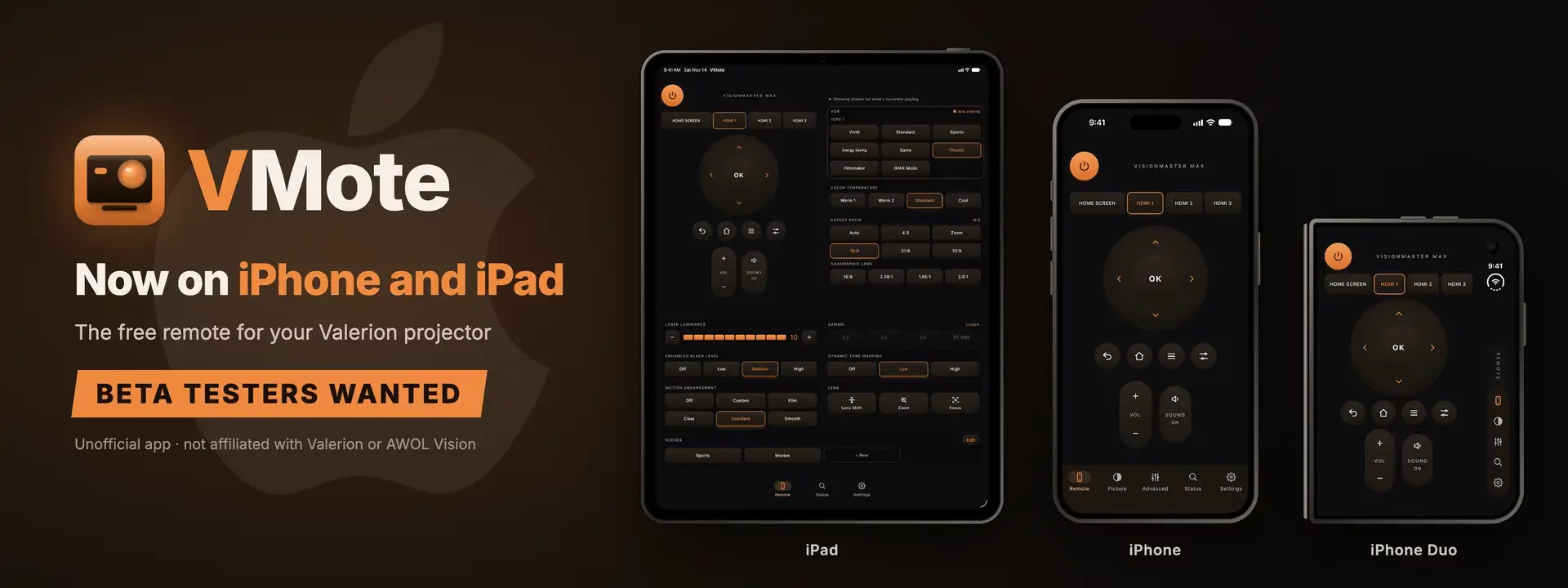
vmote-ios-beta-banner.webp
When I launched VMote, it was Android only, and a lot of you asked for an iPhone version. It's ready to test. VMote, the free, unofficial remote for Valerion projectors, now runs on iPhone and iPad, and the beta is open to anyone who wants to try it.

HOW TO JOIN
  1. Install Apple's free TestFlight app from the App Store.
  2. Open this link on your iPhone or iPad and tap Accept, then Install: Join the VMote: Projector Remote beta
  3. Open VMote. When it asks to find devices on your local network, tap Allow. It needs that to find and control your projector.

You'll need an iPhone or iPad on iOS or iPadOS 18.5 or newer, AWOL Link turned on (All Settings > Inputs > External Inputs > AWOL Link), and the projector on the same Wi-Fi network as your device.

WHAT'S IN IT
  • It's the same VMote the Android testers know:
  • Power on from standby, inputs, D-pad, volume and mute, with big, easy-to-hit keys
  • Picture modes for what's playing (SDR, HDR, HDR10+ or Dolby Vision), aspect ratio, color temperature, laser brightness, gamma, black level and motion
  • Scenes: one tap sets several picture settings at once
  • Zoom, focus and lens shift (lens shift on the Max)
  • Status tab with signal, HDR format, audio format, laser level, fans and temperatures
  • Six color themes

MADE FOR THE BIG SCREENS TOO
  • On iPad, the remote, picture and advanced controls share one screen, so there's no switching tabs to change a picture mode.
  • On iPhone Duo, you get a compact remote on the outer screen. Unfold it and the remote sits on one side with picture mode, black level and scenes on the other. It works whichever way you hold it.

TWO DIFFERENCES FROM ANDROID
  • Your device's volume buttons don't control the projector. iOS doesn't let apps use them that way.
  • The app icon doesn't change color with your theme.

WHY SOME SETTINGS AREN'T THERE
VMote talks to your projector through AWOL Link, the network control built into Valerion projectors. I've used every feature AWOL Link offers, on iPhone and iPad just as on Android, so if a setting isn't in VMote, it's because AWOL Link doesn't give apps access to it yet. I've sent AWOL requests for more (iris, DLP Turbo, game settings and white balance among them), and I'll add new settings to both versions as they become available.

THANK YOU, ANDROID TESTERS
VMote is what it is because of the people in this thread. Holding a key to repeat it, volume presets, picture modes named the way your projector names them, and a long list of fixes all came from your reports. The iPhone and iPad version starts with every one of those lessons already built in. Thank you, again.

A SPECIAL THANK YOU TO DARRELLH44
I didn't own an iPhone. darrellh44 donated his iPhone 13 so I could build and test VMote on real Apple hardware. Finding the projector on Wi-Fi, waking it from standby and scanning the MAC address with the camera can't be tested properly without a real device, so this version would not exist without him. Thank you, darrellh44.

WHAT I NEED FROM IOS TESTERS
The features are proven on Android. What's new is everything underneath, so I need to know it works properly on your iPhone or iPad. Please try:
  • Finding your projector on Wi-Fi
  • Power on from standby (it needs the projector's MAC address, which you can type or scan with the camera) and hold to power off
  • The remote keys, inputs, volume and mute
  • Picture modes, Advanced settings and scenes
  • The Status tab while something is playing
  • If you have an iPad or an iPhone Duo: the larger layouts, upright and sideways

IPHONE DUO OWNERS, I ESPECIALLY NEED YOU
If you have an iPhone Duo, please join. There aren't many of them out there yet, and its shape is the most different from every other iPhone and iPad: a small outer screen, a large inner one, and layouts that change as you fold, unfold and turn it. I want to be sure there are no issues, so please try the remote folded, unfolded, upright and sideways, and tell me about anything that looks cramped, cut off or out of place.

Bug reports, ideas and "this confused me" moments are all welcome. Reply here, email [email protected], tap Send feedback in VMote's Settings, or take a screenshot and share it through TestFlight. Please mention your projector model and which iPhone or iPad you have.

ON ANDROID?
Nothing changes. VMote is on Google Play, free, and updates keep coming: VMote: Projector Remote - Apps on Google Play

Free, with no ads and no account, same as always.

WANT TO SAY THANKS?
VMote is free, and nothing is locked behind a tip. If it's made your movie nights a little easier and you'd like to buy me a coffee, you can do that here: https://ko-fi.com/vmote
It's completely optional. Testing the beta and telling me what you find helps just as much.

VMote is an independent app. It is not made, endorsed or supported by Valerion or AWOL Vision.
 
Τον Noir τον έχεις δει;
Οχι.

Αλλα απο αυτά που διαβάζω και κρινοντας από τα specs, υποθέτω πάνω κάτω τι μπορεί να περιμένει κάποιος (εξαιρούμενων φυσικά firmware Κινεζοbugιών).

Τωρα αν θα έδινα +1000 σε σχέση με τον Valerion, δεν ξέρω....Μάλλον, ναι....εννοώ απαξ και μπεις στο τριπάκι και ''αποδεχτείς'' αυτή την νέα ''μόδα'', ας πας τουλάχιστον για το καλύτερο (εφόσον είσαι ήδη κοντά).

Περί ορέξεως, βέβαια....
 
Οχι.

Αλλα απο αυτά που διαβάζω και κρινοντας από τα specs, υποθέτω πάνω κάτω τι μπορεί να περιμένει κάποιος (εξαιρούμενων φυσικά firmware Κινεζοbugιών).

Τωρα αν θα έδινα +1000 σε σχέση με τον Valerion, δεν ξέρω....Μάλλον, ναι....εννοώ απαξ και μπεις στο τριπάκι και ''αποδεχτείς'' αυτή την νέα ''μόδα'', ας πας τουλάχιστον για το καλύτερο (εφόσον είσαι ήδη κοντά).

Περί ορέξεως, βέβαια....
Κοιτά, ένα χιλιάρικο παραπάνω δεν είναι κοντά σε προβολέα που κάνει 2,5 Κ.
Επίσης ο XGIMI Titan Noir Ultra Max δεν εχει dynamic iris απο οτι διαβαζω αλλά έχει 2 μηχανικές ίριδες για υψηλότερο "φυσικό" κοντραστ ενώ το DMD του είναι μεγαλύτερο ((0.47" vs. 0.78").
Άλλη σημαντική διαφορά είναι ότι o Noir έχει Dual laser ενώ ο Valerion Triple.
Όλα αυτά δεν ξέρω πως αποτυπώνονται τελικά στο πανί. Μόνο αν τους δεις δίπλα-διπλα μπορείς να βγάλεις ασφαλές συμπέρασμα.
 
Εχω δει πολύ περισσότερους απ όσους μάλλον υποθέτεις (μεταξύ αυτών και τον Valerion, ναι).

Και δεδομένης της εμπειρίας μου, μπορώ να κρίνω.

Δεν υπάρχει λόγος να αναχθεί η κουβέντα σε κόντρα, μπορείς να κρίνεις με τα δικά σου κριτήρια και φυσικά να απολαύσεις όποιον έχεις ;)
Δεν νομίζω ότι είναι θέμα κόντρας. Απλά ο Μάκης με 4,50 μέτρα πλάτος το Νο 1 κριτήριο του είναι το φως. Τι να τους κάνει τους JVC; να κάνει τον καντηλανάφτη;
Ναι ξέρω υπάρχει και NZ900 με 3300 lumens και δύο νεφρά μαζί donation.....
 
Δεν νομίζω ότι είναι θέμα κόντρας. Απλά ο Μάκης με 4,50 μέτρα πλάτος το Νο 1 κριτήριο του είναι το φως. Τι να τους κάνει τους JVC; να κάνει τον καντηλανάφτη;
Ναι ξέρω υπάρχει και NZ900 με 3300 lumens και δύο νεφρά μαζί donation.....
Η κουβέντα δεν αφορούσε τον JVC αλλά τον Valerion vs XGIMI
 
Για τους κατόχους, δείτε ένα πολύ ενδιαφέρον app που χειρίζεται τον προβολέα από το κινητό, χωρίς να υπάρχει ανάγκη να μπαίνουμε στο δαιδαλωδες μενού του:


View attachment 281408
When I launched VMote, it was Android only, and a lot of you asked for an iPhone version. It's ready to test. VMote, the free, unofficial remote for Valerion projectors, now runs on iPhone and iPad, and the beta is open to anyone who wants to try it.

HOW TO JOIN
  1. Install Apple's free TestFlight app from the App Store.
  2. Open this link on your iPhone or iPad and tap Accept, then Install: Join the VMote: Projector Remote beta
  3. Open VMote. When it asks to find devices on your local network, tap Allow. It needs that to find and control your projector.

You'll need an iPhone or iPad on iOS or iPadOS 18.5 or newer, AWOL Link turned on (All Settings > Inputs > External Inputs > AWOL Link), and the projector on the same Wi-Fi network as your device.

WHAT'S IN IT
  • It's the same VMote the Android testers know:
  • Power on from standby, inputs, D-pad, volume and mute, with big, easy-to-hit keys
  • Picture modes for what's playing (SDR, HDR, HDR10+ or Dolby Vision), aspect ratio, color temperature, laser brightness, gamma, black level and motion
  • Scenes: one tap sets several picture settings at once
  • Zoom, focus and lens shift (lens shift on the Max)
  • Status tab with signal, HDR format, audio format, laser level, fans and temperatures
  • Six color themes

MADE FOR THE BIG SCREENS TOO
  • On iPad, the remote, picture and advanced controls share one screen, so there's no switching tabs to change a picture mode.
  • On iPhone Duo, you get a compact remote on the outer screen. Unfold it and the remote sits on one side with picture mode, black level and scenes on the other. It works whichever way you hold it.

TWO DIFFERENCES FROM ANDROID
  • Your device's volume buttons don't control the projector. iOS doesn't let apps use them that way.
  • The app icon doesn't change color with your theme.

WHY SOME SETTINGS AREN'T THERE
VMote talks to your projector through AWOL Link, the network control built into Valerion projectors. I've used every feature AWOL Link offers, on iPhone and iPad just as on Android, so if a setting isn't in VMote, it's because AWOL Link doesn't give apps access to it yet. I've sent AWOL requests for more (iris, DLP Turbo, game settings and white balance among them), and I'll add new settings to both versions as they become available.

THANK YOU, ANDROID TESTERS
VMote is what it is because of the people in this thread. Holding a key to repeat it, volume presets, picture modes named the way your projector names them, and a long list of fixes all came from your reports. The iPhone and iPad version starts with every one of those lessons already built in. Thank you, again.

A SPECIAL THANK YOU TO DARRELLH44
I didn't own an iPhone. darrellh44 donated his iPhone 13 so I could build and test VMote on real Apple hardware. Finding the projector on Wi-Fi, waking it from standby and scanning the MAC address with the camera can't be tested properly without a real device, so this version would not exist without him. Thank you, darrellh44.

WHAT I NEED FROM IOS TESTERS
The features are proven on Android. What's new is everything underneath, so I need to know it works properly on your iPhone or iPad. Please try:
  • Finding your projector on Wi-Fi
  • Power on from standby (it needs the projector's MAC address, which you can type or scan with the camera) and hold to power off
  • The remote keys, inputs, volume and mute
  • Picture modes, Advanced settings and scenes
  • The Status tab while something is playing
  • If you have an iPad or an iPhone Duo: the larger layouts, upright and sideways

IPHONE DUO OWNERS, I ESPECIALLY NEED YOU
If you have an iPhone Duo, please join. There aren't many of them out there yet, and its shape is the most different from every other iPhone and iPad: a small outer screen, a large inner one, and layouts that change as you fold, unfold and turn it. I want to be sure there are no issues, so please try the remote folded, unfolded, upright and sideways, and tell me about anything that looks cramped, cut off or out of place.

Bug reports, ideas and "this confused me" moments are all welcome. Reply here, email [email protected], tap Send feedback in VMote's Settings, or take a screenshot and share it through TestFlight. Please mention your projector model and which iPhone or iPad you have.

ON ANDROID?
Nothing changes. VMote is on Google Play, free, and updates keep coming: VMote: Projector Remote - Apps on Google Play

Free, with no ads and no account, same as always.

WANT TO SAY THANKS?
VMote is free, and nothing is locked behind a tip. If it's made your movie nights a little easier and you'd like to buy me a coffee, you can do that here: https://ko-fi.com/vmote
It's completely optional. Testing the beta and telling me what you find helps just as much.

VMote is an independent app. It is not made, endorsed or supported by Valerion or AWOL Vision.
Τάκη μην ψαρωνεις με αυτά. Εκατό χιλιάδες touch τηλεκοντρόλ έχουμε αγοράσει και μετά ήρθαν τα κινητά με τα apps.
ΜΗΔΕΝ πρακτικότητα. Ώσπου να πιάσεις το κινητό να το ξεκλειδώσεις, έχεις κανει την δουλειά με το τηλεκοντρόλ .
Τα hard buttons είναι αναντικατάστατα. Δεν είναι τυχαίο που η Logitech είχε βγάλει λίγο touch οθόνη και όλο το κυρίως τηλεκοντρόλ ήταν με hard buttons.
 
Άλλη σημαντική διαφορά είναι ότι o Noir έχει Dual laser ενώ ο Valerion Triple.
Όλα αυτά δεν ξέρω πως αποτυπώνονται τελικά στο πανί. Μόνο αν τους δεις δίπλα-διπλα μπορείς να βγάλεις ασφαλές συμπέρασμα.
Triple έχει και o xgimi. Δίπλα δίπλα πρέπει να φτιάχνονται και απλά φεύγουν από άλλη πόρτα....

Ειπαμε πιο εφικτό είναι να δεις demo κανά πύραυλο της SpaceX παρά demo προβολείς στην ελλαδα την σήμερον ημέραν.
 
Τάκη μην ψαρωνεις με αυτά. Εκατό χιλιάδες touch τηλεκοντρόλ έχουμε αγοράσει και μετά ήρθαν τα κινητά με τα apps.
ΜΗΔΕΝ πρακτικότητα. Ώσπου να πιάσεις το κινητό να το ξεκλειδώσεις, έχεις κανει την δουλειά με το τηλεκοντρόλ .
Τα hard buttons είναι αναντικατάστατα. Δεν είναι τυχαίο που η Logitech είχε βγάλει λίγο touch οθόνη και όλο το κυρίως τηλεκοντρόλ ήταν με hard buttons.
Δεν συμφωνώ. Εγώ τα χρησιμοποιώ κατα κόρον στο Home cinema μου. Επισης, αν θυμασαι που ειναι θαμμενες οι ρυθμισεις του Valerion, καταλαβαινεις γιατι χρειαζεται το app με τα shortcuts.
 
Triple έχει και o xgimi. Δίπλα δίπλα πρέπει να φτιάχνονται και απλά φεύγουν από άλλη πόρτα....

Ειπαμε πιο εφικτό είναι να δεις demo κανά πύραυλο της SpaceX παρά demo προβολείς στην ελλαδα την σήμερον ημέραν.
Έχεις δίκιο, ο απλός Titan έχει διπλό.
 
Δεν συμφωνώ. Εγώ τα χρησιμοποιώ κατα κόρον στο Home cinema μου. Επισης, αν θυμασαι που ειναι θαμμενες οι ρυθμισεις του Valerion, καταλαβαινεις γιατι χρειαζεται το app με τα shortcuts.
Δεν με βολεψαν. Τηλεκοντρόλ και ξερο ψωμί. Χωρίς καν να κοιταζω το τηλεκοντρόλ αλλάζω εντάσεις κλπ.Μονο με την αφή. Εξάλλου κάθε μέρα με τις ρυθμίσεις θα παίζεις; Θα κάνεις 2-3 presets και τέλος.
 
  • Like
Reactions: leonkoum
Εχω δει πολύ περισσότερους απ όσους μάλλον υποθέτεις (μεταξύ αυτών και τον Valerion, ναι).

Και δεδομένης της εμπειρίας μου, μπορώ να κρίνω.

Δεν υπάρχει λόγος να αναχθεί η κουβέντα σε κόντρα, μπορείς να κρίνεις με τα δικά σου κριτήρια και φυσικά να απολαύσεις όποιον έχεις ;)
Προ θεού δεν στην είπα
Εάν νομίζεις κάτι τέτοιο σου ζητάω ταπεινά συγνώμη!!!!
 
Κοιτά, ένα χιλιάρικο παραπάνω δεν είναι κοντά σε προβολέα που κάνει 2,5 Κ.
Επίσης ο XGIMI Titan Noir Ultra Max δεν εχει dynamic iris απο οτι διαβαζω αλλά έχει 2 μηχανικές ίριδες για υψηλότερο "φυσικό" κοντραστ ενώ το DMD του είναι μεγαλύτερο ((0.47" vs. 0.78").
Άλλη σημαντική διαφορά είναι ότι o Noir έχει Dual laser ενώ ο Valerion Triple.
Όλα αυτά δεν ξέρω πως αποτυπώνονται τελικά στο πανί. Μόνο αν τους δεις δίπλα-διπλα μπορείς να βγάλεις ασφαλές συμπέρασμα.
Εδώ έχει δει λάθος μοντέλο
Διπλό laser k φωσφόρο χέρι το παλιό μοντέλο με το μεγάλο τσιπ όντως ((σκέτο titan )
Μετά βγήκε η σειρά Titan noir με τρία μοντέλα
Ο Titan noir ultra max βγήκε μετά κ έχει 1-2 μικροδιαφορές
 
  • Like
Reactions: takisot
Δεν νομίζω ότι είναι θέμα κόντρας. Απλά ο Μάκης με 4,50 μέτρα πλάτος το Νο 1 κριτήριο του είναι το φως. Τι να τους κάνει τους JVC; να κάνει τον καντηλανάφτη;
Ναι ξέρω υπάρχει και NZ900 με 3300 lumens και δύο νεφρά μαζί donation.....
Ο οποίος με το φίλτρο πέφτει κ άλλο !
4.60 παρακαλώ το πλάτος …
Δεν πάω να ανοίξω κόντρα ούτε με ενδιαφέρει
Σας ξαναλέω τα έχω δει α/β με σπλιτερ οπότε δεν τα λέω στην τύχη !
 
  • Like
Reactions: takisot