

Ερωτήσεις/Απαντήσεις για Mac γενικά...
- Thread starter Μιχάλης Κορ.
- Start date
You are using an out of date browser. It may not display this or other websites correctly.
You should upgrade or use an alternative browser.
You should upgrade or use an alternative browser.

Mihalis S.
Supreme Member
- 19 June 2006
- 3,497
Να ακούτε τους παλιούς βρε! Καλύτερος ο 24άρης! Κι όχι τίποτε άλλο, τώρα άρχισαν να μου μπαίνουν κι εμένα ιδέες να την κάνω την κουτουράδα. Η να πάρω Mac Pro για να μπω στο μάτι του Μπάμπη;;

Νίκος
Supreme Member
Αυτό να κάνεις ...ήρθε η ώρα σου για αναβάθμιση και παράληλλα να δώσεις το παλιό πλέον και μεταχειρισμένο σου mac mini σε μια συμβολική τιμή..
Τί λες?
Ε φανταστικέ μου φίλε?
Τί λες?
Ε φανταστικέ μου φίλε?
Μπάμπης Κολέζας said:Ρε μπαγάσηδες στοιχήματα μ' εμένα βάζετε; :slapface:
Έκανα τη μεγάλη βλακεία... Πήγα και είδα την 24άρα.... :chinscratch: Χάσιμο...:ernaehrung004:
Δύσκολο ΣΚ θα περάσεις...
Mihalis S.
Supreme Member
- 19 June 2006
- 3,497
Goblin said:Αυτό να κάνεις ...ήρθε η ώρα σου για αναβάθμιση και παράληλλα να δώσεις το παλιό πλέον και μεταχειρισμένο σου mac mini σε μια συμβολική τιμή..
Τί λες?
Ε φανταστικέ μου φίλε?
Νικολάκηηηη, μήπως με γλύφεις για να φας το μινάκι μου;;;;

ΘΕΟΘΑΝ said:Δύσκολο ΣΚ θα περάσεις...
Κάτσε καλά για να μη σου πώ κάτσε καλύτερα...
Δε φτάνει που είσαι ο ηθικός αυτουργός, κάνεις και πλακίτσα απο πάνω... :slapface:
Mihalis S.
Supreme Member
- 19 June 2006
- 3,497
Προβλέπω σύντομα αν συνεχίσουμε με αυτό τον ρυθμό να μετατρέψουμε το AVClub σε mAcVClub:ernaehrung004:
Γιατί, άσχημα θα ήταν ν' ανοίγαμε ειδική κατηγορία για Mac;Μιχάλης said:Προβλέπω σύντομα αν συνεχίσουμε με αυτό τον ρυθμό να μετατρέψουμε το AVClub σε mAcVClub:ernaehrung004:

Σιγά-σιγά θα γίνουμε πολλοί. :music-smiley-005:
Mihalis S.
Supreme Member
- 19 June 2006
- 3,497
Μπάμπης Κολέζας said:Γιατί, άσχημα θα ήταν ν' ανοίγαμε ειδική κατηγορία για Mac;
Σιγά-σιγά θα γίνουμε πολλοί. :music-smiley-005:
Συμφωνώ! Αντε κ. Διαχειριστά για κάνε κάτι!!

Και να μην ξεχνάμε wewantAppleGreece, για να γίνουμε ακόμη πιο πολλοί::music-smiley-005:
Mihalis S.
Supreme Member
- 19 June 2006
- 3,497
Μήπως τελικά η ελεύθερη πρόσβαση σε blog κάνει κακό στην υγεία μας; Για διαβάστε εδώ οι νέοι mac users:
Recently I read a silly article by a lawyer named Larry who switched to the Mac and hated it.
Now this guy is obviously a moron. He knows nothing about Macs and just assumed he could drop a whopping $4,552.71 on one and magically know how to use it. He writes:
I realized it was time to unload the silvery box of frustration when I had to buy a "Dummies" book on how to operate it. I'm smart; I shouldn't need this. Aren't Macs supposed to be intuitive and easy to learn? My mistake.
It gets worse, as his ignorance continues:
I pretended that I liked the one button mouse.... I really missed the little scrolling wheel in the center of the mouse.
The dummy doesn't know he could just plug in his old USB scrolling mouse from his PC and it would work fine on the Mac? He's probably so used to Windows that he thought he'd have to install a boatload of drivers to get it to work.
Next, he blames the Mac for application issues:
What drove me nuts was that I would open Word for Mac and couldn't delete files while I was in Word. There is no File | Delete option. So the documents took up space on my hard drive, until someone told me I had to find the document in Finder and then move it into the trash from there. This seemed stupid to me; I just wanted to highlight a file and tap "delete."
I guess Word on the PC has a file delete feature. Why, I can't imagine -- sounds insane and dangerous to me. Word is not a file browser, or it shouldn't be. It's a word processor. But this guy's used to that feature and blames the Mac for not having it. Complain to Microsoft, dude.
As for the second half of his comment, I can't tell if he's annoyed at having to use the Finder to manage files (that's what it's for) or if he just wants a keyboard shortcut for deleting files. If it's the latter, Command-Delete works great. If it's the former, he's just revealing his stupidity. That's like complaining that a hammer doesn't work as a screwdriver. Tools are built for a purpose and should be used for that purpose.
But the ignorance continues as the lawyer shows he doesn't know how to use and save print presets:
To do a "fast print" required clicking File, Print, find Copies & Pages, click Paper Type/Quality, click Normal and finally clicking Fast Draft. And there was no way to leave the setting as the default. I had to do it manually every time.
Complaining about the lack of a feature when it's right there within the print dialog is pretty dumb, but his next statement is even dumber:
Doing a simple screen capture was an immense chore. On a PC you just press Alt and tap PrtScr. With the Mac I had to download and launch special programs to accomplish this simple task.
Huh? First of all, Mac OS X has a bunch of keyboard shortcuts for capturing the screen (Command-Shift 3, for instance). I'll be the first to agree these aren't intuitive or well-documented, but the Mac has used those shortcuts forever (I think they go back to at least System 6) and they work great. However, if you don't like those shortcuts, just go to the Keyboard preference in System Prefs and change them to whatever you'd like!
But what's this guy talking about downloading a special program to do screen captures? The Grab application in your Utilities folder is built to do just that and it's free and built-in. I launched Apple Help from the Finder and typed in "screen capture" and came up with step-by-step instructions on how to use Grab to capture a window, the entire screen, even a menu. Can't this guy read basic help?
I didn't even bother with the Mac's iCal or Mail, which required me to buy an @mac.com address.
Oh my heavens, I can't believe the guy wrote that on a publicly accessible website. He's just advertising his ignorance. And the fact that he can't read.
A lot of the software for Mac -- such as AOL for Mac OS X -- was dumbed down and missing may features of the current PC versions.
Um. AOL? Do they still exist? Isn't admitting you use AOL a sign of brain damage?
But again, the guy's blaming Apple and the Mac for the fact that many PC-oriented companies foist off shoddy ports of their crappy software on the Mac just so they can claim they have a Mac version, when they really don't.
In defense of this lawyer, he does bring up a handful of semi-legitimate concerns. For instance, he complains about Safari:
For me the killer was the Web browser. Safari simply cannot read Flash. It is, quite simply, a second-rate browser.
On the suggestions of friends, I downloaded Netscape and Firefox, which were no better.
I can't personally think of a single website I use that's Mac-incompatible. Early on when Safari was new there were a few, and I occasionally run into a few sites that have some minor display issues, but nothing too terrible. Usually the problem is caused by poor coding by the site developer and after a few complaints, it gets fixed.
But then if a site's incompatible, I'm not going to visit it very often, am I? I also hate Flash (I've written about that previously) and avoid sites that use it heavily, though I haven't found a site where it didn't work. So Larry could have a point here; I don't use Windows so there could be sites he frequents that have problems on the Mac and I wouldn't know. But he shouldn't be complaining about this in an article -- he should be submitting Safari bug reports to Apple and complaining to the site developer that they need to test their site with multiple browsers to ensure compatibility.
For instance, Lawyer Larry creates some websites himself, but he admits they are designed for IE:
I run several Web sites, all optimized for IE 5.5 or higher. I couldn't operate my own Web sites with the Mac.
Well, duh! Microsoft has gone out of their way make Internet Explorer its own island, supporting unique HTML variations so that sites designed for IE will break on other browsers. If you're designing a website, you should always use standard HTML and test the site with multiple browsers, ideally browsers on different platforms if you can.
I noticed it was slow; I saw that stupid spinning colored wheel a lot. The Mac would hang up; the TV ads said Macs didn't do that.
Well no computer is crash-proof. Crashes happen mostly because of conflicts between software. If you just used the included Apple software I doubt you'd ever have a problem. But even the Mac isn't immune, though it's more stable than most operating systems. The PowerBook I'm writing this on has an uptime of over 52 days (my MacBook's uptime is over 67 days). Many of my computers I only reboot a few times a year, and usually that's when I'm upgrading the OS.
As far as the spinning beachball, I hate that also, but it's rarely an OS issue. I find it happens in Safari more often than I like, but my other apps work fine in the meantime. Typically the most common reason for the spinning beachball is virtual memory swapping (try switching to an app that's launched but unused for a while and you'll see the beachball spin for a moment or two). More RAM will usually help. Larry doesn't mention the specs on the machine he bought, but I wonder if he got it with the default amount of memory.
So Larry wants to get rid of his Mac because he doesn't like it. The irony is that for all the trouble he had with his Mac, it seems to pale in comparison to the problems he had with his PC:
With a former PC, I had to have my hard drive wiped clean and formatted -- several times -- after catching nasty viruses.
Yikes! I've been using Macs since 1988 -- nearly twenty years -- and I've never once had a problem so severe that it involved wiping the hard drive clean. I had some file directory problems ten years ago and had to backup my drive and reformat it, but I didn't lose much data and didn't have to rebuild my system. I've had a hard drive or two die on me and lost data that way, but that wasn't the computer's fault.
I can't imagine living in a world where viruses might cause me to have to start over with a fresh system (yet I know several PC users who do that on a yearly basis).
Conclusion
The real problem with Larry the Lawyer is that he never gave the Mac a chance. He made a ton of assumptions, including the expectation that the Mac would work just like his PC. (A pretty dumb assumption if you think about it. How could the Mac be better if it worked just like Windows?)
Larry never tried to get help from Mac gurus (other than buying his Dummies book) who could have solved most of his problems with a few minutes education and training.
I know that when I use Windows I struggle with basic tasks -- but that's because I don't use it enough to know what I'm doing. I have to search menus to find functions that seem like they should be obvious. If I really wanted to use Windows, I'd have to learn -- something Larry obviously didn't want to do. He'd heard the Mac was "easy" and assumed he could switch without pain.
I was suckered in by the hype about freedom from viruses, simplicity of computing and versatility. Instead, I bought a boat anchor that can't view Web sites properly, is not compatible with Microsoft Word and can run only dumbed-down versions of regular software.
The truth is that switching platforms -- from Mac to Windows, Windows to Mac, either to Linux -- is a complicated task. If you've been using one operating system for a while, you'll have to unlearn old habits and form new ones. It's not an overnight thing.
Some familiar software will look different and may not have the same features, even if it's the "same" program. (This is especially true if the software has "Microsoft" in the title.)
The lesson from Larry's rant for us Mac users is that we need to be careful how we promote the Mac. Though I'm a Mac fanatic at heart, I'm very careful when I recommend it. First, I make sure the person is a "Mac" person. Are they creative? Do they like nitty-gritty technical stuff? Can they see the visual difference between a Mac and a PC? Do they buy other products based solely on price or do they consider quality and value?
Larry the Lawyer definitely sounds like a PC guy. He's too impatient and stuck in his habits, and he doesn't strike me as the kind of guy who appreciates aesthetics (note he never once mentions in his article how beautiful the Mac interface looks compared the crappy Windows kludge).
Next, I try to find out exactly what a person wants to do with their computer. If it's number-crunching, spreadsheets and business stuff, requires compatibility with Windows-only programs, etc., I might recommend a PC.
I also explore why the person is interested in the switch. If their reasons are vague and undefined, that's a warning sign. They haven't done the research and are making assumptions. That's like buying a German car and assuming it'll have all the switches and levers in the same place as a Ford.
Finally, I give a demonstration of the Mac, showing key features, explaining some of the basics of how it works. I also show the online help and recommend the person actually read if they run into a problem.
If a person passes all these tests and is still interested, I recommend a Mac.
Of course today we're in a new world where Macs can run Windows and my rules have changed a bit. Now it's safe to recommend Mac hardware for anyone -- if they don't like the Mac universe, they can always just stick with Windows. At any point in the future they can reboot as a Mac and make the transition gradually.
Unfortunately for Larry the Lamebrain, he bought a G5 instead of a Intel-based Mac (he probably hadn't done his research and didn't know what was coming down the road). He also way overbought if he spent nearly $5K -- a $1500 iMac or MacBook would have been fine for his needs. No doubt a lot of his irritation was generated because of the excessive amount he paid.
Recently I read a silly article by a lawyer named Larry who switched to the Mac and hated it.
Now this guy is obviously a moron. He knows nothing about Macs and just assumed he could drop a whopping $4,552.71 on one and magically know how to use it. He writes:
I realized it was time to unload the silvery box of frustration when I had to buy a "Dummies" book on how to operate it. I'm smart; I shouldn't need this. Aren't Macs supposed to be intuitive and easy to learn? My mistake.
It gets worse, as his ignorance continues:
I pretended that I liked the one button mouse.... I really missed the little scrolling wheel in the center of the mouse.
The dummy doesn't know he could just plug in his old USB scrolling mouse from his PC and it would work fine on the Mac? He's probably so used to Windows that he thought he'd have to install a boatload of drivers to get it to work.
Next, he blames the Mac for application issues:
What drove me nuts was that I would open Word for Mac and couldn't delete files while I was in Word. There is no File | Delete option. So the documents took up space on my hard drive, until someone told me I had to find the document in Finder and then move it into the trash from there. This seemed stupid to me; I just wanted to highlight a file and tap "delete."
I guess Word on the PC has a file delete feature. Why, I can't imagine -- sounds insane and dangerous to me. Word is not a file browser, or it shouldn't be. It's a word processor. But this guy's used to that feature and blames the Mac for not having it. Complain to Microsoft, dude.
As for the second half of his comment, I can't tell if he's annoyed at having to use the Finder to manage files (that's what it's for) or if he just wants a keyboard shortcut for deleting files. If it's the latter, Command-Delete works great. If it's the former, he's just revealing his stupidity. That's like complaining that a hammer doesn't work as a screwdriver. Tools are built for a purpose and should be used for that purpose.
But the ignorance continues as the lawyer shows he doesn't know how to use and save print presets:
To do a "fast print" required clicking File, Print, find Copies & Pages, click Paper Type/Quality, click Normal and finally clicking Fast Draft. And there was no way to leave the setting as the default. I had to do it manually every time.
Complaining about the lack of a feature when it's right there within the print dialog is pretty dumb, but his next statement is even dumber:
Doing a simple screen capture was an immense chore. On a PC you just press Alt and tap PrtScr. With the Mac I had to download and launch special programs to accomplish this simple task.
Huh? First of all, Mac OS X has a bunch of keyboard shortcuts for capturing the screen (Command-Shift 3, for instance). I'll be the first to agree these aren't intuitive or well-documented, but the Mac has used those shortcuts forever (I think they go back to at least System 6) and they work great. However, if you don't like those shortcuts, just go to the Keyboard preference in System Prefs and change them to whatever you'd like!
But what's this guy talking about downloading a special program to do screen captures? The Grab application in your Utilities folder is built to do just that and it's free and built-in. I launched Apple Help from the Finder and typed in "screen capture" and came up with step-by-step instructions on how to use Grab to capture a window, the entire screen, even a menu. Can't this guy read basic help?
I didn't even bother with the Mac's iCal or Mail, which required me to buy an @mac.com address.
Oh my heavens, I can't believe the guy wrote that on a publicly accessible website. He's just advertising his ignorance. And the fact that he can't read.
A lot of the software for Mac -- such as AOL for Mac OS X -- was dumbed down and missing may features of the current PC versions.
Um. AOL? Do they still exist? Isn't admitting you use AOL a sign of brain damage?
But again, the guy's blaming Apple and the Mac for the fact that many PC-oriented companies foist off shoddy ports of their crappy software on the Mac just so they can claim they have a Mac version, when they really don't.
In defense of this lawyer, he does bring up a handful of semi-legitimate concerns. For instance, he complains about Safari:
For me the killer was the Web browser. Safari simply cannot read Flash. It is, quite simply, a second-rate browser.
On the suggestions of friends, I downloaded Netscape and Firefox, which were no better.
I can't personally think of a single website I use that's Mac-incompatible. Early on when Safari was new there were a few, and I occasionally run into a few sites that have some minor display issues, but nothing too terrible. Usually the problem is caused by poor coding by the site developer and after a few complaints, it gets fixed.
But then if a site's incompatible, I'm not going to visit it very often, am I? I also hate Flash (I've written about that previously) and avoid sites that use it heavily, though I haven't found a site where it didn't work. So Larry could have a point here; I don't use Windows so there could be sites he frequents that have problems on the Mac and I wouldn't know. But he shouldn't be complaining about this in an article -- he should be submitting Safari bug reports to Apple and complaining to the site developer that they need to test their site with multiple browsers to ensure compatibility.
For instance, Lawyer Larry creates some websites himself, but he admits they are designed for IE:
I run several Web sites, all optimized for IE 5.5 or higher. I couldn't operate my own Web sites with the Mac.
Well, duh! Microsoft has gone out of their way make Internet Explorer its own island, supporting unique HTML variations so that sites designed for IE will break on other browsers. If you're designing a website, you should always use standard HTML and test the site with multiple browsers, ideally browsers on different platforms if you can.
I noticed it was slow; I saw that stupid spinning colored wheel a lot. The Mac would hang up; the TV ads said Macs didn't do that.
Well no computer is crash-proof. Crashes happen mostly because of conflicts between software. If you just used the included Apple software I doubt you'd ever have a problem. But even the Mac isn't immune, though it's more stable than most operating systems. The PowerBook I'm writing this on has an uptime of over 52 days (my MacBook's uptime is over 67 days). Many of my computers I only reboot a few times a year, and usually that's when I'm upgrading the OS.
As far as the spinning beachball, I hate that also, but it's rarely an OS issue. I find it happens in Safari more often than I like, but my other apps work fine in the meantime. Typically the most common reason for the spinning beachball is virtual memory swapping (try switching to an app that's launched but unused for a while and you'll see the beachball spin for a moment or two). More RAM will usually help. Larry doesn't mention the specs on the machine he bought, but I wonder if he got it with the default amount of memory.
So Larry wants to get rid of his Mac because he doesn't like it. The irony is that for all the trouble he had with his Mac, it seems to pale in comparison to the problems he had with his PC:
With a former PC, I had to have my hard drive wiped clean and formatted -- several times -- after catching nasty viruses.
Yikes! I've been using Macs since 1988 -- nearly twenty years -- and I've never once had a problem so severe that it involved wiping the hard drive clean. I had some file directory problems ten years ago and had to backup my drive and reformat it, but I didn't lose much data and didn't have to rebuild my system. I've had a hard drive or two die on me and lost data that way, but that wasn't the computer's fault.
I can't imagine living in a world where viruses might cause me to have to start over with a fresh system (yet I know several PC users who do that on a yearly basis).
Conclusion
The real problem with Larry the Lawyer is that he never gave the Mac a chance. He made a ton of assumptions, including the expectation that the Mac would work just like his PC. (A pretty dumb assumption if you think about it. How could the Mac be better if it worked just like Windows?)
Larry never tried to get help from Mac gurus (other than buying his Dummies book) who could have solved most of his problems with a few minutes education and training.
I know that when I use Windows I struggle with basic tasks -- but that's because I don't use it enough to know what I'm doing. I have to search menus to find functions that seem like they should be obvious. If I really wanted to use Windows, I'd have to learn -- something Larry obviously didn't want to do. He'd heard the Mac was "easy" and assumed he could switch without pain.
I was suckered in by the hype about freedom from viruses, simplicity of computing and versatility. Instead, I bought a boat anchor that can't view Web sites properly, is not compatible with Microsoft Word and can run only dumbed-down versions of regular software.
The truth is that switching platforms -- from Mac to Windows, Windows to Mac, either to Linux -- is a complicated task. If you've been using one operating system for a while, you'll have to unlearn old habits and form new ones. It's not an overnight thing.
Some familiar software will look different and may not have the same features, even if it's the "same" program. (This is especially true if the software has "Microsoft" in the title.)
The lesson from Larry's rant for us Mac users is that we need to be careful how we promote the Mac. Though I'm a Mac fanatic at heart, I'm very careful when I recommend it. First, I make sure the person is a "Mac" person. Are they creative? Do they like nitty-gritty technical stuff? Can they see the visual difference between a Mac and a PC? Do they buy other products based solely on price or do they consider quality and value?
Larry the Lawyer definitely sounds like a PC guy. He's too impatient and stuck in his habits, and he doesn't strike me as the kind of guy who appreciates aesthetics (note he never once mentions in his article how beautiful the Mac interface looks compared the crappy Windows kludge).
Next, I try to find out exactly what a person wants to do with their computer. If it's number-crunching, spreadsheets and business stuff, requires compatibility with Windows-only programs, etc., I might recommend a PC.
I also explore why the person is interested in the switch. If their reasons are vague and undefined, that's a warning sign. They haven't done the research and are making assumptions. That's like buying a German car and assuming it'll have all the switches and levers in the same place as a Ford.
Finally, I give a demonstration of the Mac, showing key features, explaining some of the basics of how it works. I also show the online help and recommend the person actually read if they run into a problem.
If a person passes all these tests and is still interested, I recommend a Mac.
Of course today we're in a new world where Macs can run Windows and my rules have changed a bit. Now it's safe to recommend Mac hardware for anyone -- if they don't like the Mac universe, they can always just stick with Windows. At any point in the future they can reboot as a Mac and make the transition gradually.
Unfortunately for Larry the Lamebrain, he bought a G5 instead of a Intel-based Mac (he probably hadn't done his research and didn't know what was coming down the road). He also way overbought if he spent nearly $5K -- a $1500 iMac or MacBook would have been fine for his needs. No doubt a lot of his irritation was generated because of the excessive amount he paid.
Μόλις άνοιξα το θέμα βγήκατε σιγά-σιγά όλοι....Μπάμπης Κολέζας said:Γιατί, άσχημα θα ήταν ν' ανοίγαμε ειδική κατηγορία για Mac;
Σιγά-σιγά θα γίνουμε πολλοί. :music-smiley-005:
Άντε να γινόμαστε πολλοί λοιπόν κ ακόμα περισσότεροι...:ernaehrung004:
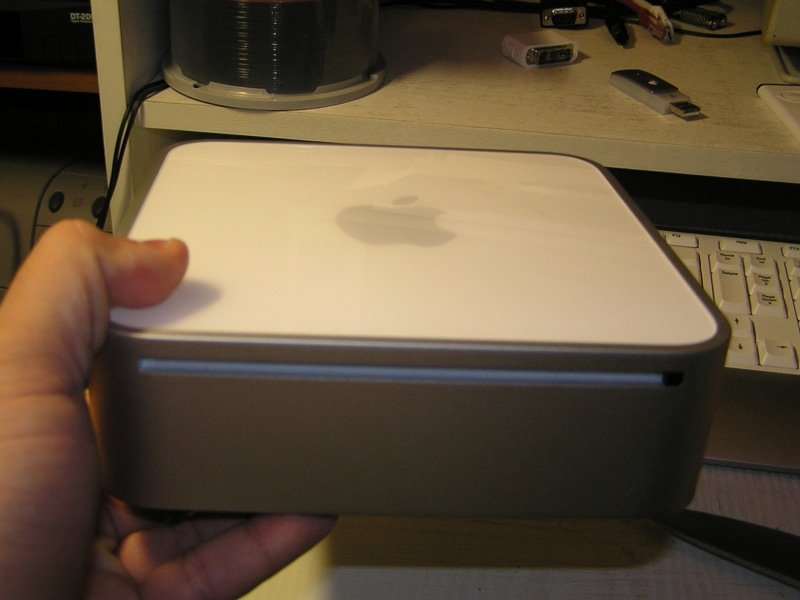
Χθες το άνοιξα το μίνι για να εγκαταστήσω την μνήμη 1gb που αγόρασα από Γερμανία με 88.80 ευρώ μαζί με τα μεταφορικά.
Είχα άγχος γιατί ανοίγει δύσκολα το μίνι αλλά τελικά όλα πήγαν καλά κα ο 'ασθενής' έζησε. :firstprize:
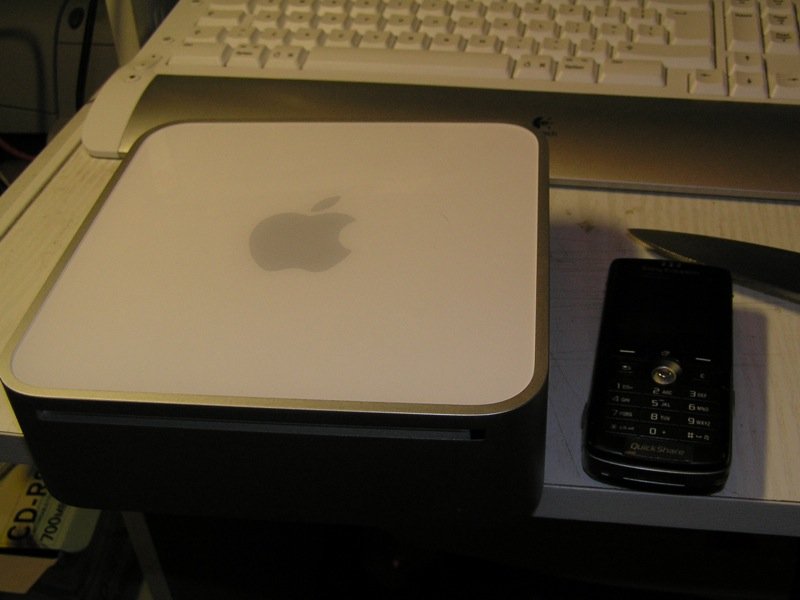
Βλέπετε στις φωτό πόσο μικρό είναι.
Φαίνεται στην φωτό κ το μαχαίρι για το σφάξιμο ! :slapface:
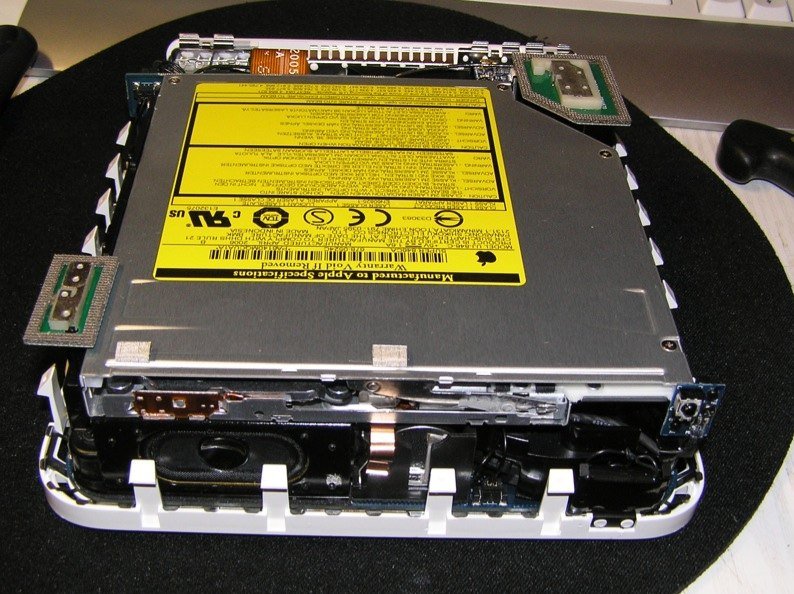
Στην φωτό 4 φαίνεται το ηχείο αλλά κ πάνω δεξία το μικρό μαύρο 'ματάκι' είναι για το τηλεχειριστήριο.
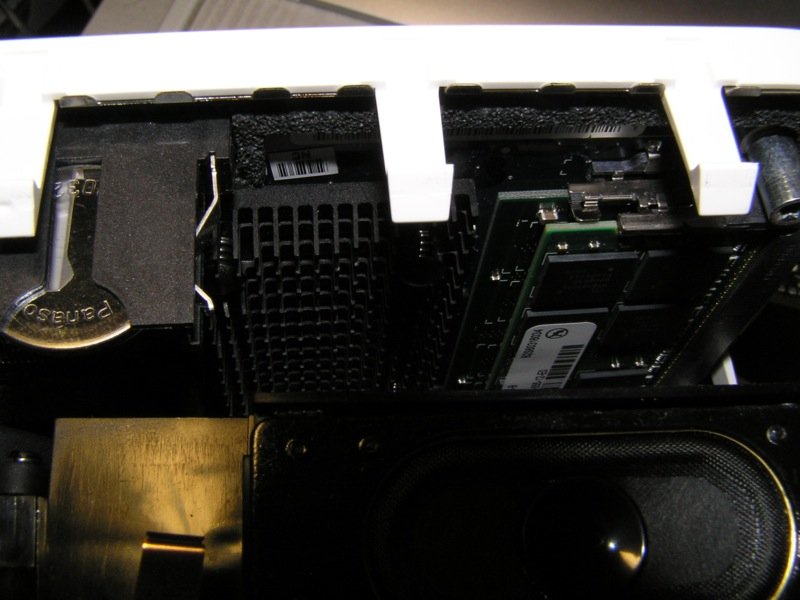
Στην φωτό 5 φαίνονται οι μνήμες κ πως είναι τοποθετημένες. Για να την βγάλω μου πήρε 15 λεπτά προσεκτικό ξεβίδωμα.
Είχα άγχος γιατί ανοίγει δύσκολα το μίνι αλλά τελικά όλα πήγαν καλά κα ο 'ασθενής' έζησε. :firstprize:
Βλέπετε στις φωτό πόσο μικρό είναι.
Φαίνεται στην φωτό κ το μαχαίρι για το σφάξιμο ! :slapface:
Στην φωτό 4 φαίνεται το ηχείο αλλά κ πάνω δεξία το μικρό μαύρο 'ματάκι' είναι για το τηλεχειριστήριο.
Στην φωτό 5 φαίνονται οι μνήμες κ πως είναι τοποθετημένες. Για να την βγάλω μου πήρε 15 λεπτά προσεκτικό ξεβίδωμα.
Attachments

Last edited:
Δύο ακόμα φωτό.
Βλέπετε ότι το μηχάνημα είναι από κομμάτια φορητών υπολογιστών, δίσκος 2,5", dvd χωρίς tray φυσικά από φορητό, μεγάλος ανεμιστήρας αλλά 101% αθόρυβος, μνήμες sodimm κτλ. Ακόμα κ το ηχείο είναι πολύ μικρό, οβάλ μάλιστα σχήμα για να χωρά...!
Ο δίσκος είναι της Seagate ενώ το dvdrecorder είναι της Panasonic.
Βλέπετε ότι το μηχάνημα είναι από κομμάτια φορητών υπολογιστών, δίσκος 2,5", dvd χωρίς tray φυσικά από φορητό, μεγάλος ανεμιστήρας αλλά 101% αθόρυβος, μνήμες sodimm κτλ. Ακόμα κ το ηχείο είναι πολύ μικρό, οβάλ μάλιστα σχήμα για να χωρά...!
Ο δίσκος είναι της Seagate ενώ το dvdrecorder είναι της Panasonic.
Attachments
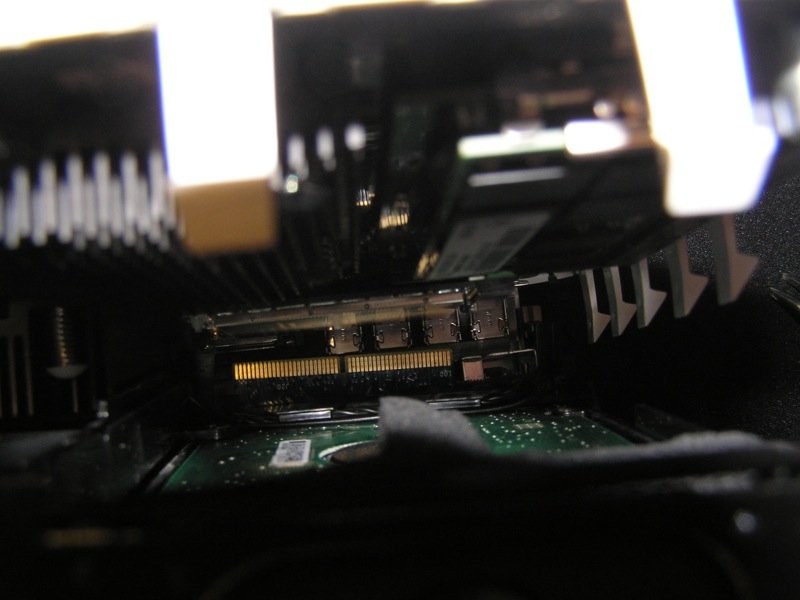
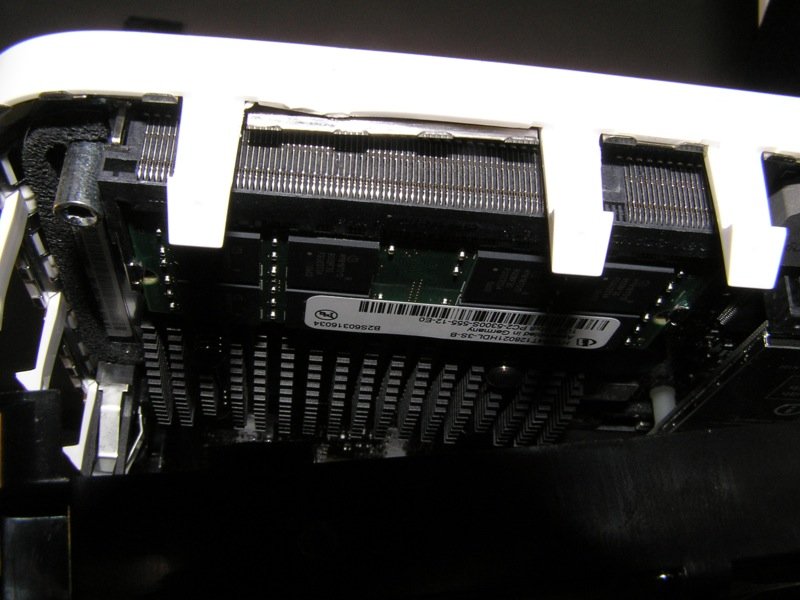
Η σπάτουλες που είχα δεν έκαναν, το μαχαίρι όμως ήταν σούπερ....! χαχαχα
Την αναβάθμιση μνήμης την ήθελε οπωσδήποτε τελικά. Διαφορά τεράστια.
Ανοίγει πιο γρήγορα, φορτώνει της εφαρμογές σαφώς πιο γρήγορα ενώ στο monitor που βλέπεις κάθε εφαρμογή τι πόρους καταναλώνει, πριν έκανε συνέχεια virtual memory ενώ τώρα καθόλου.
Στο call of duty 2 πριν είχα ανάλυση 640*480 με medium γραφικά ενώ τώρα άνετα την 800*600 κ γραφικά normal.
Την αναβάθμιση μνήμης την ήθελε οπωσδήποτε τελικά. Διαφορά τεράστια.
Ανοίγει πιο γρήγορα, φορτώνει της εφαρμογές σαφώς πιο γρήγορα ενώ στο monitor που βλέπεις κάθε εφαρμογή τι πόρους καταναλώνει, πριν έκανε συνέχεια virtual memory ενώ τώρα καθόλου.
Στο call of duty 2 πριν είχα ανάλυση 640*480 με medium γραφικά ενώ τώρα άνετα την 800*600 κ γραφικά normal.
Mihalis S.
Supreme Member
- 19 June 2006
- 3,497
Την ίδια διαδικασία έκανα κι εγώ όταν πρωτοβγήκε το μινάκι. Δεν έχει πρόβλημα αρκεί να το ανοίξεις πολύ προσεκτικά ώστε να μην πληγωθούν τα δοντάκια. Φυσικά δεν το έκανα με χασαπομάχερο όπως ο Μιχαλάκης αλλά με σπατουλες και το συνιστώ ανεπιφύλακτα. Πιο εύκολο γίνεται το άνοιγμα με 2 σπάτουλες! :ernaehrung004: Οντως το μινάκι χρειάζεται τουλάχιστον 1Gb μνήμης για να φυσάει ο Τίγρης.
όπως ο Μιχαλάκης αλλά με σπατουλες και το συνιστώ ανεπιφύλακτα. Πιο εύκολο γίνεται το άνοιγμα με 2 σπάτουλες! :ernaehrung004: Οντως το μινάκι χρειάζεται τουλάχιστον 1Gb μνήμης για να φυσάει ο Τίγρης.
Ναι μεν χρησιμοποίησα χασαπομάχαιρο αλλά ήμουν ιδιαίτερα προσεκτικός.
Όλα πήγαν καλά, στράβωσαν πολύ λίγο 1-2 σιδερένια δοντάκια τα οποία κ ξαναίσιωσα κ όλα καλά.
Σιγά μην έδινα 200+ ευρώ για 1gb μνήμη εδώ στο Ελλάντα βρε παιδιά....
Έδωσα 88.80 για αγορά από Γερμανικό Ιντερνετικό μαγαζί μαζί με τα μεταφορικά σπίτι μου. Αγορά από ebay.de κ πληρωμή με Paypal. Κ γράφει κ 'made in germany'. Συν ότι παίζει μια χαρά.
Οπότε η εγχείρηση άξιζε κ με το παραπάνω.
Όλα πήγαν καλά, στράβωσαν πολύ λίγο 1-2 σιδερένια δοντάκια τα οποία κ ξαναίσιωσα κ όλα καλά.
Σιγά μην έδινα 200+ ευρώ για 1gb μνήμη εδώ στο Ελλάντα βρε παιδιά....
Έδωσα 88.80 για αγορά από Γερμανικό Ιντερνετικό μαγαζί μαζί με τα μεταφορικά σπίτι μου. Αγορά από ebay.de κ πληρωμή με Paypal. Κ γράφει κ 'made in germany'. Συν ότι παίζει μια χαρά.
Οπότε η εγχείρηση άξιζε κ με το παραπάνω.

daskalakis marios
Established Member
- 19 June 2006
- 240
Παιδιά επειδή και εγώ ψιλοτρώγομαι τελευταία με τον iMAC 20,(ο 24άρης δε χωράει στο γραφείο του φαρμακείου), και επειδή είμαι και ψιλοάσχετος, αν τοποθετήσω και τα windows xp πάνω του θα έχω συμβατότητα με όλα τα προγράμματα; Ρωτάω κυρίως γιατί θα ήθελα να τρέχει το πρόγραμμα του φαρμακείου που είναι σε DOS.
Απάντηση: Re: Ερωτήσεις/Απαντήσεις για Mac γενικά...
Μάριε τα έχεις δεί από κοντά;
daskalakis marios said:Παιδιά επειδή και εγώ ψιλοτρώγομαι τελευταία με τον iMAC 20,(ο 24άρης δε χωράει στο γραφείο του φαρμακείου), και επειδή είμαι και ψιλοάσχετος, αν τοποθετήσω και τα windows xp πάνω του θα έχω συμβατότητα με όλα τα προγράμματα; Ρωτάω κυρίως γιατί θα ήθελα να τρέχει το πρόγραμμα του φαρμακείου που είναι σε DOS.
Μάριε τα έχεις δεί από κοντά;