
Περί DxO OpticsPro/DxO PhotoLab/PureRaw επεξεργαστής Raw.
- Thread starter cacau
- Start date
You are using an out of date browser. It may not display this or other websites correctly.
You should upgrade or use an alternative browser.
You should upgrade or use an alternative browser.


Είχα αρκετά χρόνια να ασχοληθώ με λογισμικό της DxO
Δοκίμασα το pureraw 6 πρόσφατα και έμεινα έκπληκτος απο το αποτέλεσμα!
Έχω ενθουσιαστεί σε τέτοιο βαθμό που πιάνω ξανά αρχαία raw files με την d50 και πραγματικά μεταμορφώνονται!
Δοκίμασα το pureraw 6 πρόσφατα και έμεινα έκπληκτος απο το αποτέλεσμα!
Έχω ενθουσιαστεί σε τέτοιο βαθμό που πιάνω ξανά αρχαία raw files με την d50 και πραγματικά μεταμορφώνονται!

Kosh
AVClub Fanatic
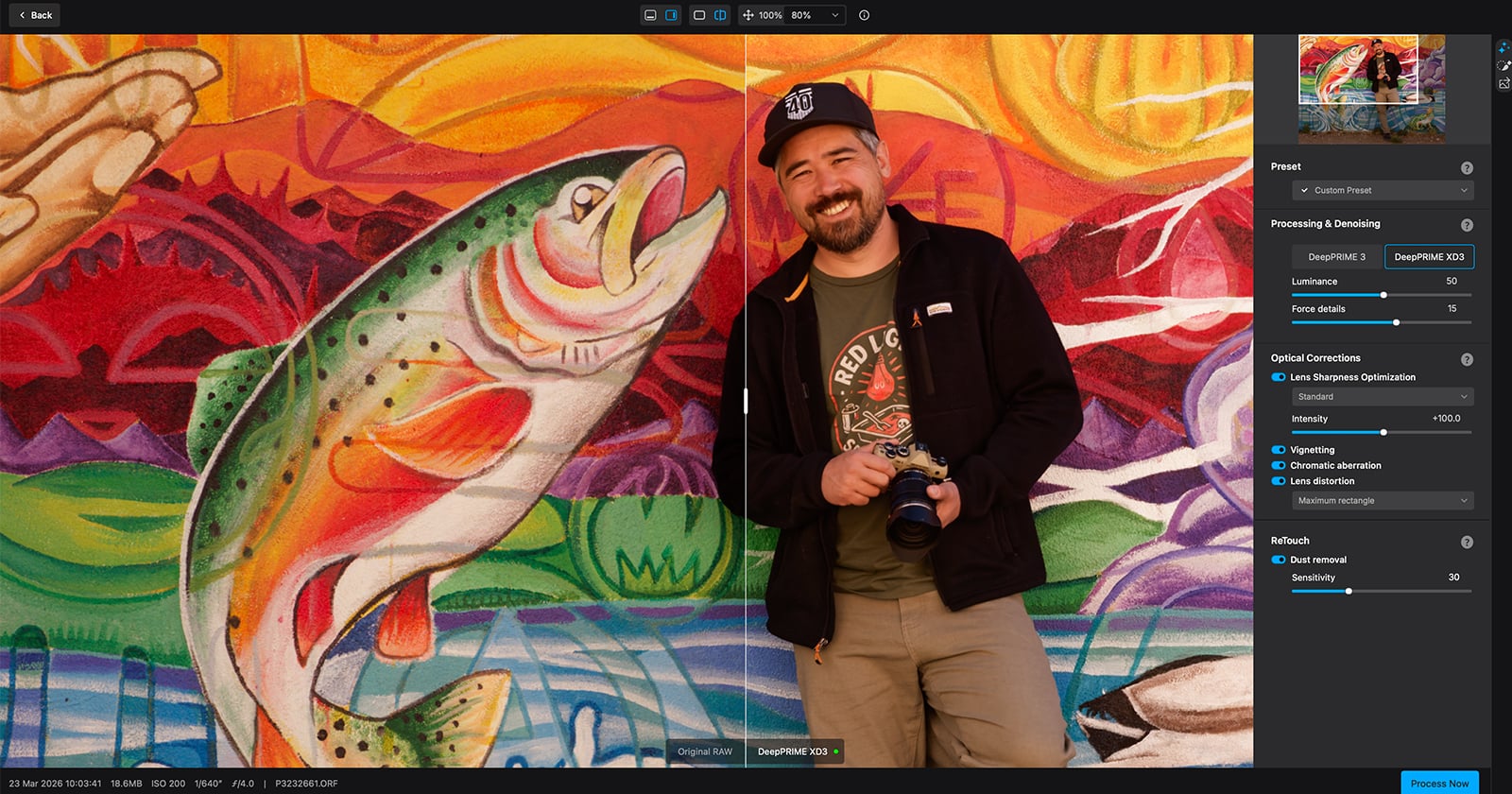
DxO PureRAW 6: The Ultimate Beginner’s Guide
At full resolution, photos that looked clean in the field starts falling apart: noise in the shadows, soft edges, or even dust spots.
...Και μέχρι το Black Friday θα έχει γίνει κι αυτό:
"Although PhotoLab 10 will not include the Export to Affinity button at launch, DxO plans to add an improved version in an update later in September. This will give photographers a direct route from PhotoLab to Affinity."
"Although PhotoLab 10 will not include the Export to Affinity button at launch, DxO plans to add an improved version in an update later in September. This will give photographers a direct route from PhotoLab to Affinity."
Kosh
AVClub Fanatic
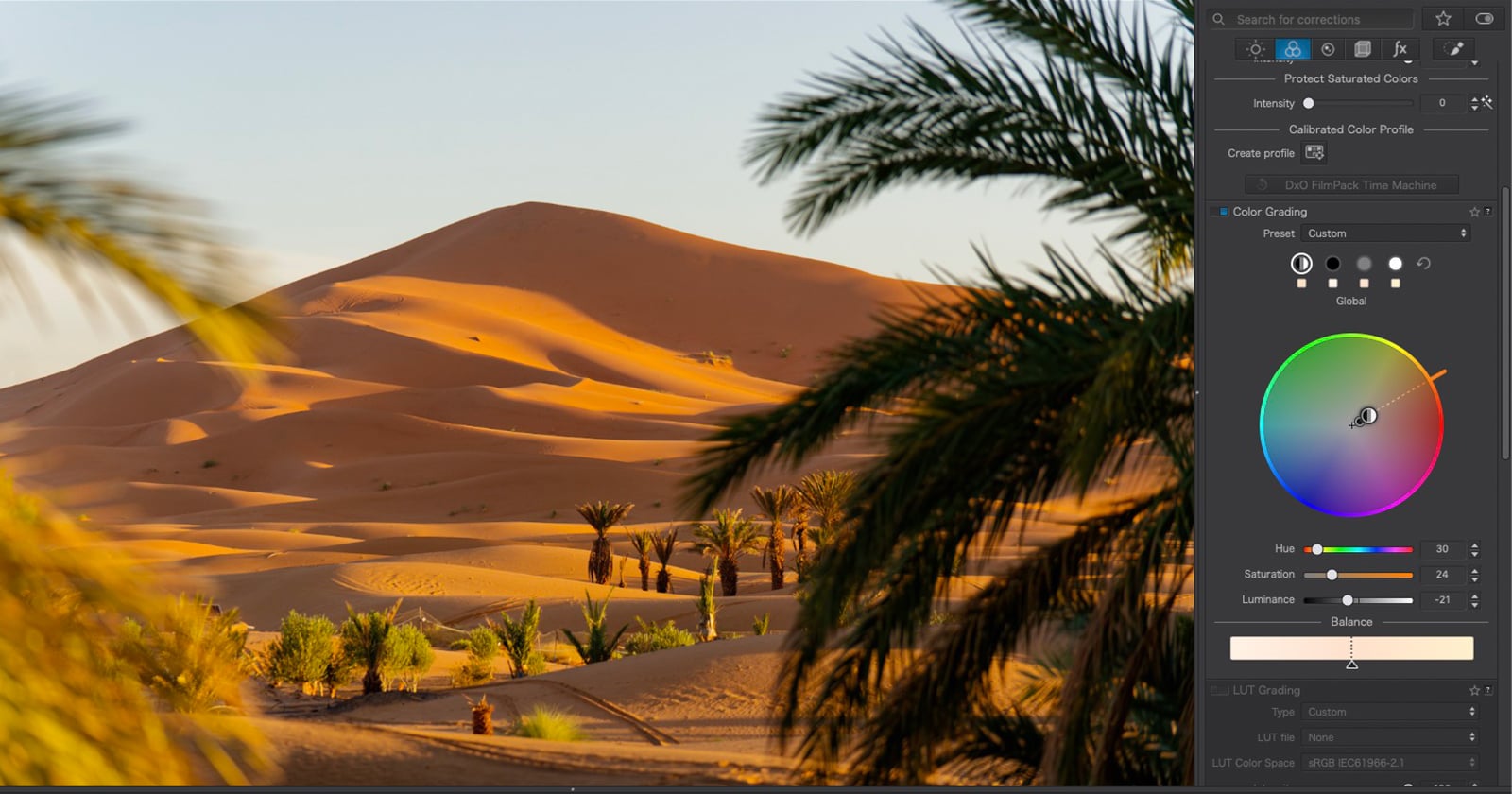
DxO PhotoLab 10: Faster RAW Editing Without Giving Up Creative Control
See how DxO PhotoLab 10 speeds up RAW editing with AI and Depth Masks, automatic dust removal, and Color Grading, freeing more time for creative decisions.
Μείον 20% αυτό το ΣΚ για ΝΕΟΥΣ πελάτες* σε όλα τα προγράμματα της DxO με τον κωδικό PetaPixelLD2026

 petapixel.com
αλλά ΠΡΙΝ αγοράσετε προσοχή στις απαιτήσεις συστήματος - ειδικά για το Photolab 10:
Minimum system configuration:
• Intel® Core™ 10000 series or Intel® Core™ Ultra 7 165H or AMD Ryzen™ with 4 cores
• 16 GB RAM
• 30 GB available disk space
• 1280 x 768 display
• Microsoft® Windows® 10 version 22H2
• Microsoft® Windows® 11 version 24H2 (For AI masks feature)
For AI Features:
• NVIDIA RTX™ 3000 with 8GB of VRAM with latest drivers
• AMD Radeon RX6000 series with 8GB of VRAM with latest drivers
• Intel ARC with 8GB of VRAM with latest drivers
• Intel® AI Boost for Core™ Ultra
Recommended system configuration:
• Intel® Core™ 10000 series or Intel® Core™ Ultra 7 165H or AMD Ryzen™ with 8 cores
• 32 GB RAM
• 50 GB available disk space
• 1920 x 1080 display
• Microsoft® Windows® 11 version 24H2
For AI Features:
• NVIDIA RTX™ 4060 Ti 16 GB with latest drivers
• AMD Radeon™ RX 7700 XT 12 GB with latest drivers
macOS®
Minimum system configuration:
• Any CPU
• 16 GB RAM
• 30 GB available disk space
• 1280 x 768 display
• macOS 15.7 (Sequoia)
For DeepPRIME 3, DeepPRIME XD3:
• Apple M1 or Intel® Mac with AMD Radeon™ Pro RX5700
For AI Mask, Dust Detection:
• Apple M1
Recommended system configuration:
• Apple M2 Pro
• 32 GB RAM
• 50 GB available disk space
• 1920 x 1080 display
• macOS 26 (Tahoe)
Practical information
• You can activate your DxO PhotoLab software on 2 computers (Mac and/or PC) with the ESSENTIAL edition, and on 3 computers with the ELITE edition.
• An internet connection is required to use the Software and specifically for its activation. After online activation, DxO PhotoLab can be used offline for 37 days before a connection to DxO’s servers is required. Notifications advising that a connection is needed will be displayed after 30 days.
*Οι παλιοί θα περιμένουμε την επόμενη περίοδο εκπτώσεων, μια και δεν ισχύει για μας...

Get 20% Off All DxO Software, Including PhotoLab 10, This Weekend | PetaPixel
I put DxO PhotoLab 10 to work on a set of my RAW files from Morocco. The new feature I liked most was the Depth Mask tool. On one of my favorite photos from the Sahara, I used it to build a mask based on distance from the camera. That let me adjust the exposure,
αλλά ΠΡΙΝ αγοράσετε προσοχή στις απαιτήσεις συστήματος - ειδικά για το Photolab 10:
System requirements
Minimum system configuration:
• Intel® Core™ 10000 series or Intel® Core™ Ultra 7 165H or AMD Ryzen™ with 4 cores
• 16 GB RAM
• 30 GB available disk space
• 1280 x 768 display
• Microsoft® Windows® 10 version 22H2
• Microsoft® Windows® 11 version 24H2 (For AI masks feature)
For AI Features:
• NVIDIA RTX™ 3000 with 8GB of VRAM with latest drivers
• AMD Radeon RX6000 series with 8GB of VRAM with latest drivers
• Intel ARC with 8GB of VRAM with latest drivers
• Intel® AI Boost for Core™ Ultra
Recommended system configuration:
• Intel® Core™ 10000 series or Intel® Core™ Ultra 7 165H or AMD Ryzen™ with 8 cores
• 32 GB RAM
• 50 GB available disk space
• 1920 x 1080 display
• Microsoft® Windows® 11 version 24H2
For AI Features:
• NVIDIA RTX™ 4060 Ti 16 GB with latest drivers
• AMD Radeon™ RX 7700 XT 12 GB with latest drivers
macOS®
Minimum system configuration:
• Any CPU
• 16 GB RAM
• 30 GB available disk space
• 1280 x 768 display
• macOS 15.7 (Sequoia)
For DeepPRIME 3, DeepPRIME XD3:
• Apple M1 or Intel® Mac with AMD Radeon™ Pro RX5700
For AI Mask, Dust Detection:
• Apple M1
Recommended system configuration:
• Apple M2 Pro
• 32 GB RAM
• 50 GB available disk space
• 1920 x 1080 display
• macOS 26 (Tahoe)
Practical information
• You can activate your DxO PhotoLab software on 2 computers (Mac and/or PC) with the ESSENTIAL edition, and on 3 computers with the ELITE edition.
• An internet connection is required to use the Software and specifically for its activation. After online activation, DxO PhotoLab can be used offline for 37 days before a connection to DxO’s servers is required. Notifications advising that a connection is needed will be displayed after 30 days.
*Οι παλιοί θα περιμένουμε την επόμενη περίοδο εκπτώσεων, μια και δεν ισχύει για μας...

Το ενσωμάτωσαν στην τελευταία αναβάθμιση:
Your edit no longer stops here. Develop your RAW file in PhotoLab, then send it straight to Affinity as a native .af file, ready for pixel-level editing. RAW perfection on one side, creative freedom on the other. Affinity is free on Mac and Windows.
Your edit no longer stops here. Develop your RAW file in PhotoLab, then send it straight to Affinity as a native .af file, ready for pixel-level editing. RAW perfection on one side, creative freedom on the other. Affinity is free on Mac and Windows.
Καλές οι συνεργασίες αλλά καλύτερα ακόμη ένα πρόγραμμα να είναι αυτάρκες και να μην χρειάζεται να αλλάζεις πλατφόρμα και να ξέρεις και άλλο για να τελειώσεις μια δουλειά. αυτά τα workflow περνάω από DXO για γεωμετρία και noise μετά LR για αυτό μετά Affinity για το άλλο είναι μακριά γαϊδούρα ιστορία και μόνο γιαυτους που έχουν άπειρο χρόνο να ξοδέψουν σε επεξεργασία και έχουν γνώσεις λίγο από όλα
Kosh
AVClub Fanatic

DxO ViewPoint 6: Perspective Correction Without Crops | Fstoppers
ViewPoint 6 introduces AI masks to ReShape Fusion, letting photographers correct perspective and distortion on individual elements without losing frame edges. No pixels generated, full control stays with the photographer.
 fstoppers.com
DxO ViewPoint 6 is available today from the DxO website for macOS and Windows computers:
- New license: $129.99 / €119.99 / £109.99
- Upgrade from DxO ViewPoint 5: $84.99 / €74.99 / £69.99