
Fuji XT-2 φωτογραφία
- Thread starter tiniakos
- Start date
You are using an out of date browser. It may not display this or other websites correctly.
You should upgrade or use an alternative browser.
You should upgrade or use an alternative browser.

Γιαννης Σπυρου
AVClub Fanatic
δεν εχω τωρα πια τη σονυ... αν βρω καποια θα το κανω.
φλατ εικονα δεν εχει η σονυ, απλα η fuji λογω xtrans εχει λιγοτερο moire-aliasing kai false color , κι εχει πιο μεγαλη ευαiσθησια στο μπλε χρωμα, λογω κατασκευης του αισθητηρα

To εχω ξαναπει ομως, η τελικη εικονα που παιρνουμε με τις fuji , εξαρταται πολυ απο τον RAW converter Που χρησιμοποιουμε (οταν τραβαμε RAW φυσικα).
Το Adobe LR εχει καποια θεματα, το εχω αναλυσει στο θεμα της XT10.
Oποιος τραβαει RAWκαλο ειναι να χρησιμοποιει το IRIDIENT που εχει καλυτερο de-bayering.
φλατ εικονα δεν εχει η σονυ, απλα η fuji λογω xtrans εχει λιγοτερο moire-aliasing kai false color , κι εχει πιο μεγαλη ευαiσθησια στο μπλε χρωμα, λογω κατασκευης του αισθητηρα
To εχω ξαναπει ομως, η τελικη εικονα που παιρνουμε με τις fuji , εξαρταται πολυ απο τον RAW converter Που χρησιμοποιουμε (οταν τραβαμε RAW φυσικα).
Το Adobe LR εχει καποια θεματα, το εχω αναλυσει στο θεμα της XT10.
Oποιος τραβαει RAWκαλο ειναι να χρησιμοποιει το IRIDIENT που εχει καλυτερο de-bayering.
Γιαννης Σπυρου
AVClub Fanatic
δυστυχως δεν υπαρχει για pc , Μονο για mac!
Σε Pc υπαρχει μια δοκιμαστικη εκδοση, χωρις σπασιμο δυστυχως!
Το iridient δινει καλυτερα αποτελεσματα ειδικα σε φωτο τοπιου , με βλαστηση, γρασιδια, δεντρα κλπ. αλλα και σε προσωπα.
δες εδω απο παλιοτερη συγκριση... (ανοιξε την στο flickr)
 iridient vs capture one by John Spirou, on Flickr
Σε Pc υπαρχει μια δοκιμαστικη εκδοση, χωρις σπασιμο δυστυχως!
Το iridient δινει καλυτερα αποτελεσματα ειδικα σε φωτο τοπιου , με βλαστηση, γρασιδια, δεντρα κλπ. αλλα και σε προσωπα.
δες εδω απο παλιοτερη συγκριση... (ανοιξε την στο flickr)
iridient vs capture one by John Spirou, on Flickr
Γιαννης Σπυρου
AVClub Fanatic
ΟΛΑ τα τεστ και reviews που εχω διαβασει για την Fuji XT2 (χωρις ΚΑΜΙΑ εξαιρεση) αναφερουν σαν αρνητικο το γεγονος οτι δεν εχει επιλογη για να γραφεις τα jpg/raw σε μια καρτα, και τα βιντεο στην αλλη ...
ΛΑΘΟΣ
Εχει , απλα θελει λιγο ψαξιμο.
Εγω μολις το βρηκα και το εκανα.
Μπορεις να εχεις ολες τις φωτο σε μια καρτα και τα βιντεο στην αλλη !
ΛΑΘΟΣ
Εχει , απλα θελει λιγο ψαξιμο.
Εγω μολις το βρηκα και το εκανα.
Μπορεις να εχεις ολες τις φωτο σε μια καρτα και τα βιντεο στην αλλη !
Γιαννης Σπυρου
AVClub Fanatic
αλλο ενα λαθος που νομιζω οτι κανουν παλι σε ολα τα Reviews, σε JPG FINE (στη καλυτερη ποιοτητα δηλ.) , εχεις unlimmited buffer !
Τραβηξα περιπου 500 σε burst mode και απλα σταματησα γιατι κουραστηκα!!!
Πρεπει φυσικα να εχεις το BOOST ON και καρτα SDHC II (εχω LEXAR PRO me 300 MB/sec)
σε RAW εχει περιπου 60-65 συνολικα, αλλα το buffer αδιαζει πολυ γρηγορα κι ετσι ξανα-τραβας αμμεσως, μετα χωρις να σταματας παρα ελαχιστα.
Τραβηξα περιπου 500 σε burst mode και απλα σταματησα γιατι κουραστηκα!!!
Πρεπει φυσικα να εχεις το BOOST ON και καρτα SDHC II (εχω LEXAR PRO me 300 MB/sec)
σε RAW εχει περιπου 60-65 συνολικα, αλλα το buffer αδιαζει πολυ γρηγορα κι ετσι ξανα-τραβας αμμεσως, μετα χωρις να σταματας παρα ελαχιστα.

_tzo_
Banned
Όχι σε όλα τα reviews.
Απεριόριστο buffer έχεις μάλιστα όχι μόνο με Fine Jpeg, αλλά ακόμη και με RAW (lossless compressed) + Fine Jpeg με 5fps.
RAW / JPEG is an interesting setting for FINE+RAW shooters lusting for maximum performance. In this mode, RAWs are transferred to slot 1 (where I use a super-fast Lexar Professional 2000x UHS-II card), while my FINE-quality JPEGs are simultaneously transferred to slot 2 (where I use a “regular” UHS-II card like the SanDisk Extreme Pro UHS-II or Toshiba Exceria Pro). This is the fastest setup for anybody who wants to work with RAWs and high-quality JPEGs, and it’s also pretty secure, because if one card (or slot) fails, you’ll still have either the JPEGs or the RAW files on the other card. In this mode—and with the memory card combination I just mentioned—you can actually shoot an endless stream of full-size FINE+RAW images at 5 fps, because the camera’s frame buffer will empty just as quickly as it is restocked.
To achieve this impressive performance, it’s mandatory to use the compressed RAW data format, which basically cuts the RAW file size in half (down to 20-30 MB per image). Yes, that’s smaller than the uncompressed RAWs of the 16 megapixel X-T1.Fujifilm’s compression method is completely lossless, so using it takes no toll on image quality. The compression is hardware based and super-fast.
http://www.fujirumors.com/first-look-review-fujifilm-x-t2/
Απεριόριστο buffer έχεις μάλιστα όχι μόνο με Fine Jpeg, αλλά ακόμη και με RAW (lossless compressed) + Fine Jpeg με 5fps.
RAW / JPEG is an interesting setting for FINE+RAW shooters lusting for maximum performance. In this mode, RAWs are transferred to slot 1 (where I use a super-fast Lexar Professional 2000x UHS-II card), while my FINE-quality JPEGs are simultaneously transferred to slot 2 (where I use a “regular” UHS-II card like the SanDisk Extreme Pro UHS-II or Toshiba Exceria Pro). This is the fastest setup for anybody who wants to work with RAWs and high-quality JPEGs, and it’s also pretty secure, because if one card (or slot) fails, you’ll still have either the JPEGs or the RAW files on the other card. In this mode—and with the memory card combination I just mentioned—you can actually shoot an endless stream of full-size FINE+RAW images at 5 fps, because the camera’s frame buffer will empty just as quickly as it is restocked.
To achieve this impressive performance, it’s mandatory to use the compressed RAW data format, which basically cuts the RAW file size in half (down to 20-30 MB per image). Yes, that’s smaller than the uncompressed RAWs of the 16 megapixel X-T1.Fujifilm’s compression method is completely lossless, so using it takes no toll on image quality. The compression is hardware based and super-fast.
http://www.fujirumors.com/first-look-review-fujifilm-x-t2/
Γιαννης Σπυρου
AVClub Fanatic
δεν λεω φυσικα σε 5 fps... αλλα σε 8 , το μεγιστο που μπορεις χωρις grip με μηχανικο κλειστρο.
Κακως δεν το ανεφερα...
Κακως δεν το ανεφερα...
_tzo_
Banned
To ίδιο είναι σε MB τα 8 Fine Jpeg με τα 5 Raw Lossless Compressed.
Εδώ προσφέρει unlimited buffer 5 Raw+Fine Jpeg σε δύο ξεχωριστές κάρτες, στα 8 Fine Jpeg θα κολλούσε;
Εδώ προσφέρει unlimited buffer 5 Raw+Fine Jpeg σε δύο ξεχωριστές κάρτες, στα 8 Fine Jpeg θα κολλούσε;
Skywriter55
AVClub Enthusiast
- 11 January 2015
- 952
δεν εχω τωρα πια τη σονυ... αν βρω καποια θα το κανω.
φλατ εικονα δεν εχει η σονυ, απλα η fuji λογω xtrans εχει λιγοτερο moire-aliasing kai false color , κι εχει πιο μεγαλη ευαiσθησια στο μπλε χρωμα, λογω κατασκευης του αισθητηρα
To εχω ξαναπει ομως, η τελικη εικονα που παιρνουμε με τις fuji , εξαρταται πολυ απο τον RAW converter Που χρησιμοποιουμε (οταν τραβαμε RAW φυσικα).
Το Adobe LR εχει καποια θεματα, το εχω αναλυσει στο θεμα της XT10.
Oποιος τραβαει RAWκαλο ειναι να χρησιμοποιει το IRIDIENT που εχει καλυτερο de-bayering.
Το έχω αγοράσει το IRIDIENT για Windows και είμαι αρκετά ευχαριστημένος,αν και η beta έκδοση έχει κάποια θεματάκια ανάλογα τις ρυθμίσεις που θα επιλέξεις. Ακόμα και έτσι ,μάλλον το καλύτερο raw converter για Fuji/Windows

Απάντηση: Re: Fuji XT-2 φωτογραφία
Παιδιά, προσοχή τυχόν αναφορές σε links για σπασμένα προγράμματα οχι σε δημοσίευση, θα σβήνονται άμεσα.
Γιάννη όσο την ψαχουλεύεις είμαι σίγουρος ότι θα βρείς και αλλες διαφορές ή σημεία που δεν έχουν καλύψει τα review, οι περισσότεροι reviewers έχουν περιορισμένο χρόνο με την μηχανή ή δεν έχουν την όρεξη να ψάξουν τα ψιλά γράμματα.
Παιδιά, προσοχή τυχόν αναφορές σε links για σπασμένα προγράμματα οχι σε δημοσίευση, θα σβήνονται άμεσα.
Γιάννη όσο την ψαχουλεύεις είμαι σίγουρος ότι θα βρείς και αλλες διαφορές ή σημεία που δεν έχουν καλύψει τα review, οι περισσότεροι reviewers έχουν περιορισμένο χρόνο με την μηχανή ή δεν έχουν την όρεξη να ψάξουν τα ψιλά γράμματα.
Last edited:

Under Fire
AVClub Enthusiast
Απάντηση: Re: Fuji XT-2 φωτογραφία
....ή δεν έχουν την γνώση, αλλιώς προς όφελος τους πιστεύω θ αναφερόταν σε λεπτομερη και σωστα συμπερασματαΓιάννη όσο την ψαχουλεύεις είμαι σίγουρος ότι θα βρείς και αλλες διαφορές ή σημεία που δεν έχουν καλύψει τα review, οι περισσότεροι reviewers έχουν περιορισμένο χρόνο με την μηχανή ή δεν έχουν την όρεξη να ψάξουν τα ψιλά γράμματα.
Last edited by a moderator:
Γιαννης Σπυρου
AVClub Fanatic
βγηκε μια αναβαθμιση για την ΧΤ2 (V 1,20), αλλα οχι αυτη που περιμενουμε το Μαιο !
Διορθωνει απλα καποιο Bug με το νεο flash Της Fuji EF-X500
http://www.fujifilm.com/support/digital_cameras/software/firmware/x/xt2/index.html
Διορθωνει απλα καποιο Bug με το νεο flash Της Fuji EF-X500
http://www.fujifilm.com/support/digital_cameras/software/firmware/x/xt2/index.html
Γιαννης Σπυρου
AVClub Fanatic
εδω ειναι ολες οι αναβαθμισεις που ερχονται σε λιγο για την ΧΤ2...
http://www.fujirumors.com/fujifilm-...rmware-x-t2-x-pro2-33-improvements-full-list/
X-T2 version 2.00 & X-Pro2 version 3.00 – due late March 2017
1. Shooting RAW in Bracketing and Advanced Filters
The update enables you to use the RAW format when shooting not only in AE Bracketing but also in other Bracketing modes (ISO, Dynamic Range, White Balance, Film Simulaitons) and also in Advanced Filter modes.
2. Extended ISO 125 and 160 selectable
The update adds ISO125 and ISO160 to extended ISO levels available.
3. Programmable long exposure of up to 15 minutes
Long exposure in the T mode currently goes only up to 30 seconds. The update will allow users to extend it up to 15 minutes.
4. ON/OFF for 1/3-step shutter speed adjustment (X-T2 only – already in X-Pro2)
The update allows you to turn off the Command Dial’s function to adjust shutter speed by 1/3 steps in order to prevent unintended adjustments.
5. Full-range ISO adjustments with the Command Dial (X-T2 only)
With the update, set the ISO “A” position to “Command” to adjust ISO sensitivity across the full range, including extended ISOs, with the Front Command Dial.
6. “AUTO” setting added for the minimum shutter speed in the ISO Auto setting
The update adds an AUTO option for the minimum shutter speed in the ISO Auto setting, that allows the camera to automatically define the minimum shutter speed according to the focal length of the lens attached.
7. Faster “Face Detection AF”
The update enables the use of Phase Detection AF for faster performance in Face Detection AF.
8. Improved in-focus indication in the AF-C mode
The update reduces focus hunting in the AF-C mode, making it easier to track a subject.
9. Addition of a smaller Focus Point size in Single Point AF
The update adds a smaller Focus Point size in Single Point AF, bringing the total number of available sizes to six. The new smallest size facilitates pin-point focusing.
10. Addition of “AF Point Display” (X-Pro2 only – already on X-T2)
With the update, you can choose to have AF Points constantly displayed in Zone AF and Wide / Tracking AF, making it easier to track a subject.
11. Addition of “AF-C Custom Setting” (X-Pro2 only – already on X-T2)
The update adds “AF-C Custom Setting” for specifying focus-tracking characteristics. Choose from five presets according to your subject’s type of movements.
12. Addition of “Portrait / Landscape AF Mode Switching” (X-T2 only)
The update allows you to specify separate AF mode and AF point settings for portrait orientation and landscape orientation.
13. Change of focus frame position while enlarging it
The update allows you to move the position of focus frame while enlarging it in Single Point in the AF-S mode or in the Manual Focus
14. Activation of the Eye Sensor in video recording (X-T2 only)
The update allows you to use the Eye Sensor during video recording to automatically switch between EVF and LCD.
15. Change of ISO sensitivity during video recording (X-T2 only)
The update allows you to change ISO setting during video recording.
16. Re-autofocusing in video recording
With the update, half-press the Shutter Release button or press the button assigned to “AF-ON” function during video recording to re-do autofocusing.
17. Display live histogram during video recording (X-T2 only)
The update allows you to display a live histogram during video recording.
18. Optimization of external microphone’s input level (X-T2 only)
The update optimizes external microphone’s input level (lower limit revised from -12dB to 20dB) to reduce white noise when an external microphone with preamp is connected.
19. Addition of “Eye Sensor + LCD Image Display” in the View Mode
The update gives the “Eye Sensor + LCD Image Display” option in the View Mode that allows you to shoot through the viewfinder and check images on the LCD, just as you would with an SLR.
20. Shorter EVF display time-lag (X-Pro2 only – already in X-T2)
The update shortens EVF’s display time-lag in the AF-C mode so that you will not miss a photo opportunity.
21. Constant “Dual” mode display (X-T2 only)
With the update, the small window in the Dual mode stays on even when you half-press the shutter release button.
22. Automatic vertical GUI for LCD (X-T2 only)
With the update, when you hold the camera in the portrait orientation, the camera will automatically display the GUI on the LCD in the same orientation.
23. Name Custom Settings
The update allows you to assign a specific name to Custom Settings 1 – 7.
24. Copyright information in EXIF data
The update allows you to register the photographer’s name and the copyright holder’s name in advance so that the camera automatically adds the information to EXIF data for each image.
25. Voice Memo function
The update enable you to record 30-second “Voice Memo” clips in the Playback mode.
26. Extended AE Bracketing
The update extends AE Bracketing from the current 3 frames +/-2EV to up to 9 frames +/-3EV.
27. Addition of “Shoot Without Card” mode
With the update, you can have the “Shoot Without Card” mode turned OFF so that the camera can not shoot when there is no SD card inserted.
X-T2 version 2.10 & X-Pro2 version 3.10 – late May 2017
28. Support for computer tethering via Wi-Fi (X-T2 only)
The update adds support for computer tethering via Wi-Fi.
29. Addition of “All” AF mode (X-T2 only)
With the update, select “All” in the AF mode so that you can select the AF mode and Focus Area size by only using the Command Dial.
30. Function extension for “Shutter AF” and “Shutter AE” (X-T2 only)
With the update, you can specify different settings for AF-S and AF-C in “Shutter AF” and for AF-S / MF and AF-C in “Shutter AE.”
31. Addition of “-6” and “-7” to EVF’s brightness setting
Additional options of “-6” and “-7” to the “EVF Brightness” setting so that, even in an extremely low-light condition, the brightness of the EVF does not distract you from shooting.
32. Switchover of the main and sub displays in the Dual Display mode (X-T2 only)
The update allows you to switch between the main and sub displays in the Dual Display mode.
33. Function assignment to the Rear Command Dial
With the update, you can assign a specific function to be activated when the Rear Command Dial is pressed.
http://www.fujirumors.com/fujifilm-...rmware-x-t2-x-pro2-33-improvements-full-list/
X-T2 version 2.00 & X-Pro2 version 3.00 – due late March 2017
1. Shooting RAW in Bracketing and Advanced Filters
The update enables you to use the RAW format when shooting not only in AE Bracketing but also in other Bracketing modes (ISO, Dynamic Range, White Balance, Film Simulaitons) and also in Advanced Filter modes.
2. Extended ISO 125 and 160 selectable
The update adds ISO125 and ISO160 to extended ISO levels available.
3. Programmable long exposure of up to 15 minutes
Long exposure in the T mode currently goes only up to 30 seconds. The update will allow users to extend it up to 15 minutes.
4. ON/OFF for 1/3-step shutter speed adjustment (X-T2 only – already in X-Pro2)
The update allows you to turn off the Command Dial’s function to adjust shutter speed by 1/3 steps in order to prevent unintended adjustments.
5. Full-range ISO adjustments with the Command Dial (X-T2 only)
With the update, set the ISO “A” position to “Command” to adjust ISO sensitivity across the full range, including extended ISOs, with the Front Command Dial.
6. “AUTO” setting added for the minimum shutter speed in the ISO Auto setting
The update adds an AUTO option for the minimum shutter speed in the ISO Auto setting, that allows the camera to automatically define the minimum shutter speed according to the focal length of the lens attached.
7. Faster “Face Detection AF”
The update enables the use of Phase Detection AF for faster performance in Face Detection AF.
8. Improved in-focus indication in the AF-C mode
The update reduces focus hunting in the AF-C mode, making it easier to track a subject.
9. Addition of a smaller Focus Point size in Single Point AF
The update adds a smaller Focus Point size in Single Point AF, bringing the total number of available sizes to six. The new smallest size facilitates pin-point focusing.
10. Addition of “AF Point Display” (X-Pro2 only – already on X-T2)
With the update, you can choose to have AF Points constantly displayed in Zone AF and Wide / Tracking AF, making it easier to track a subject.
11. Addition of “AF-C Custom Setting” (X-Pro2 only – already on X-T2)
The update adds “AF-C Custom Setting” for specifying focus-tracking characteristics. Choose from five presets according to your subject’s type of movements.
12. Addition of “Portrait / Landscape AF Mode Switching” (X-T2 only)
The update allows you to specify separate AF mode and AF point settings for portrait orientation and landscape orientation.
13. Change of focus frame position while enlarging it
The update allows you to move the position of focus frame while enlarging it in Single Point in the AF-S mode or in the Manual Focus
14. Activation of the Eye Sensor in video recording (X-T2 only)
The update allows you to use the Eye Sensor during video recording to automatically switch between EVF and LCD.
15. Change of ISO sensitivity during video recording (X-T2 only)
The update allows you to change ISO setting during video recording.
16. Re-autofocusing in video recording
With the update, half-press the Shutter Release button or press the button assigned to “AF-ON” function during video recording to re-do autofocusing.
17. Display live histogram during video recording (X-T2 only)
The update allows you to display a live histogram during video recording.
18. Optimization of external microphone’s input level (X-T2 only)
The update optimizes external microphone’s input level (lower limit revised from -12dB to 20dB) to reduce white noise when an external microphone with preamp is connected.
19. Addition of “Eye Sensor + LCD Image Display” in the View Mode
The update gives the “Eye Sensor + LCD Image Display” option in the View Mode that allows you to shoot through the viewfinder and check images on the LCD, just as you would with an SLR.
20. Shorter EVF display time-lag (X-Pro2 only – already in X-T2)
The update shortens EVF’s display time-lag in the AF-C mode so that you will not miss a photo opportunity.
21. Constant “Dual” mode display (X-T2 only)
With the update, the small window in the Dual mode stays on even when you half-press the shutter release button.
22. Automatic vertical GUI for LCD (X-T2 only)
With the update, when you hold the camera in the portrait orientation, the camera will automatically display the GUI on the LCD in the same orientation.
23. Name Custom Settings
The update allows you to assign a specific name to Custom Settings 1 – 7.
24. Copyright information in EXIF data
The update allows you to register the photographer’s name and the copyright holder’s name in advance so that the camera automatically adds the information to EXIF data for each image.
25. Voice Memo function
The update enable you to record 30-second “Voice Memo” clips in the Playback mode.
26. Extended AE Bracketing
The update extends AE Bracketing from the current 3 frames +/-2EV to up to 9 frames +/-3EV.
27. Addition of “Shoot Without Card” mode
With the update, you can have the “Shoot Without Card” mode turned OFF so that the camera can not shoot when there is no SD card inserted.
X-T2 version 2.10 & X-Pro2 version 3.10 – late May 2017
28. Support for computer tethering via Wi-Fi (X-T2 only)
The update adds support for computer tethering via Wi-Fi.
29. Addition of “All” AF mode (X-T2 only)
With the update, select “All” in the AF mode so that you can select the AF mode and Focus Area size by only using the Command Dial.
30. Function extension for “Shutter AF” and “Shutter AE” (X-T2 only)
With the update, you can specify different settings for AF-S and AF-C in “Shutter AF” and for AF-S / MF and AF-C in “Shutter AE.”
31. Addition of “-6” and “-7” to EVF’s brightness setting
Additional options of “-6” and “-7” to the “EVF Brightness” setting so that, even in an extremely low-light condition, the brightness of the EVF does not distract you from shooting.
32. Switchover of the main and sub displays in the Dual Display mode (X-T2 only)
The update allows you to switch between the main and sub displays in the Dual Display mode.
33. Function assignment to the Rear Command Dial
With the update, you can assign a specific function to be activated when the Rear Command Dial is pressed.

Μαζί με το firmware θα κατεβάζεις υποχρεωτικά και το logo "XT-3", με την υποχρέωση να το τυπώσεις και να το κολλήσεις στην μηχανή. Μετά θα τραβάς ένα selfie της μηχανής και αυτόματα θα ενεργοποιείται το νέο firmware...
Χαχαχα σωστός

Απάντηση: Re: Fuji XT-2 φωτογραφία
Πραγματι η Fuji συνηθϊζει να <ανταμοίβει> τους πελατες της με πλούσια νέα χαρακτηριστικά στα firmware που βγάζει, πολλά απο αυτά βέβαια τα χαρακτηριστικά ήδη υπάρχουν σε αλλες εταιρίες αλλα αυτό δεν αλλάζει καθόλου την χρησιμότητα τους ή την πληρότητα που έστω και λίγο καθυστερημένα η εταιρια παρέχει στα νέα μοντέλα της.
ΥΣ
και κανονικά καθε φορά τα γνωστά site που ασχολούνται με τα review μετά απο σημαντικα firmware πρέπει να επαναλαμβάνουν και τα ανάλογα τεστ τους, ειδικά αυτά που αφορούν τις βελτιώσεις...
Πραγματι η Fuji συνηθϊζει να <ανταμοίβει> τους πελατες της με πλούσια νέα χαρακτηριστικά στα firmware που βγάζει, πολλά απο αυτά βέβαια τα χαρακτηριστικά ήδη υπάρχουν σε αλλες εταιρίες αλλα αυτό δεν αλλάζει καθόλου την χρησιμότητα τους ή την πληρότητα που έστω και λίγο καθυστερημένα η εταιρια παρέχει στα νέα μοντέλα της.
ΥΣ
και κανονικά καθε φορά τα γνωστά site που ασχολούνται με τα review μετά απο σημαντικα firmware πρέπει να επαναλαμβάνουν και τα ανάλογα τεστ τους, ειδικά αυτά που αφορούν τις βελτιώσεις...
Skywriter55
AVClub Enthusiast
- 11 January 2015
- 952
Πολύ τίμιο να δώσουν και στην X-Pro2 τα AF-C custom settings,άπειρες βελτιώσεις ,πολύ σημαντικές και όχι αναμενόμενες οι 7 ως 11
Γιαννης Σπυρου
AVClub Fanatic
Re: Fuji xt-20
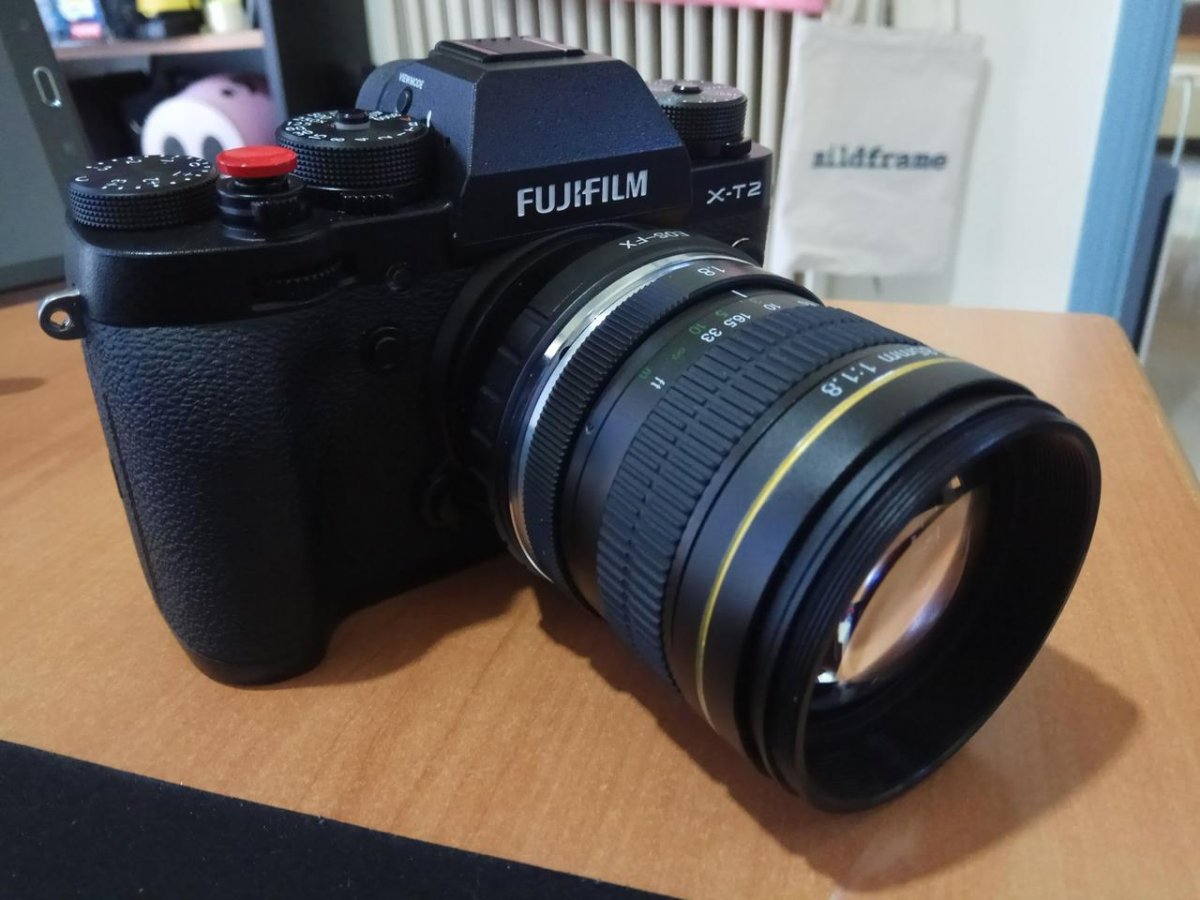
ΕΣτην εκθεση ειδα και δουλεψα τον περιφημο Fuji XF 90αρη f/2 κι εμεινα ακρως εντυπωσιασμενος.
Αλλα απο τη μια η τιμη του, κοντα στα 1000 ευρω , και απο την αλλη η ελλειψη σταθεροποιησης , μ εκαναν να δω καποιον manual φακο.
Επεσα πανω σ αυτον εδω το φακο Opteka 85mm 1.8
και τον παρελαβα σημερα.
Ειναι μικρος , αλλα αρκετα βαρυς, μεταλικη κατασκευη, με "βαρυ" δαχτυλιδι διαφραγματος και "ελαφρυ" δαχτυλιδι για εστιαση.
Ερχεται σε Canon EF mount και η εταιρεια τον στελνει μαζι με ανταπτορα για Fuji.
Exei ελαχιστη αποσταση εστιασης τα 85 cm,και εχει 55mm ανοιγμα για φιλτρο.
Η εστιαση ειναι πολυ ευκολη με την XT2 και ειδικα με τη "διπλη" οθονη στο EVF ειναι παιχνιδακι!
Δεν εχει σχεδον καθολου βινιετα (!) , ουτε γεωμετρικη παραμορφωση ...
Εχει ομως αρκετο CA σε f/1.8 kai βελτιωνεται απο f/4 και πανω.
Μοιαζει με τον Samynag 85μμ 1,4, αλλα ειναι πιο μικρος κι ελαφρυς...και πολυ πιο φτηνος.
Για τα λεφτα του συστηνεται ανεπιφυλακτα.
 opteka 85mm 1.8 by John Spirou, on Flickr
ΕΣτην εκθεση ειδα και δουλεψα τον περιφημο Fuji XF 90αρη f/2 κι εμεινα ακρως εντυπωσιασμενος.
Αλλα απο τη μια η τιμη του, κοντα στα 1000 ευρω , και απο την αλλη η ελλειψη σταθεροποιησης , μ εκαναν να δω καποιον manual φακο.
Επεσα πανω σ αυτον εδω το φακο Opteka 85mm 1.8
και τον παρελαβα σημερα.
Ειναι μικρος , αλλα αρκετα βαρυς, μεταλικη κατασκευη, με "βαρυ" δαχτυλιδι διαφραγματος και "ελαφρυ" δαχτυλιδι για εστιαση.
Ερχεται σε Canon EF mount και η εταιρεια τον στελνει μαζι με ανταπτορα για Fuji.
Exei ελαχιστη αποσταση εστιασης τα 85 cm,και εχει 55mm ανοιγμα για φιλτρο.
Η εστιαση ειναι πολυ ευκολη με την XT2 και ειδικα με τη "διπλη" οθονη στο EVF ειναι παιχνιδακι!
Δεν εχει σχεδον καθολου βινιετα (!) , ουτε γεωμετρικη παραμορφωση ...
Εχει ομως αρκετο CA σε f/1.8 kai βελτιωνεται απο f/4 και πανω.
Μοιαζει με τον Samynag 85μμ 1,4, αλλα ειναι πιο μικρος κι ελαφρυς...και πολυ πιο φτηνος.
Για τα λεφτα του συστηνεται ανεπιφυλακτα.
opteka 85mm 1.8 by John Spirou, on Flickr
Γιαννης Σπυρου
AVClub Fanatic
Re: Fuji xt-20
εδω η απουσια βινιετας , με τερμα ανοιχτο διαφραγμα!
 DSCF1754 by John Spirou, on Flickr
το CA στα ακρα...
 85mm_ca by John Spirou, on Flickr
και διορθωμενο στο LR...
 85mm_no_ca by John Spirou, on Flickr
εδω η απουσια βινιετας , με τερμα ανοιχτο διαφραγμα!
DSCF1754 by John Spirou, on Flickrτο CA στα ακρα...
85mm_ca by John Spirou, on Flickrκαι διορθωμενο στο LR...
85mm_no_ca by John Spirou, on Flickr
Γιαννης Σπυρου
AVClub Fanatic
Re: Fuji xt-20
στο κεντρο ειναι αξιοπρεπης σε f/1.8 kai soft στα ακρα (αλλα δε νομιζω οτι ενδιαφερει κανεναν εκει, αφου προοριζεται για πορτραιτα).
Γινεται πολυ οξυς σε f/4 και πανω, ακομα και στα ακρα.
Εδω θα βρειτε πολλα δειγματα απο χρηστη του flickr
https://www.flickr.com/photos/117279548@N08/sets/72157651737459088
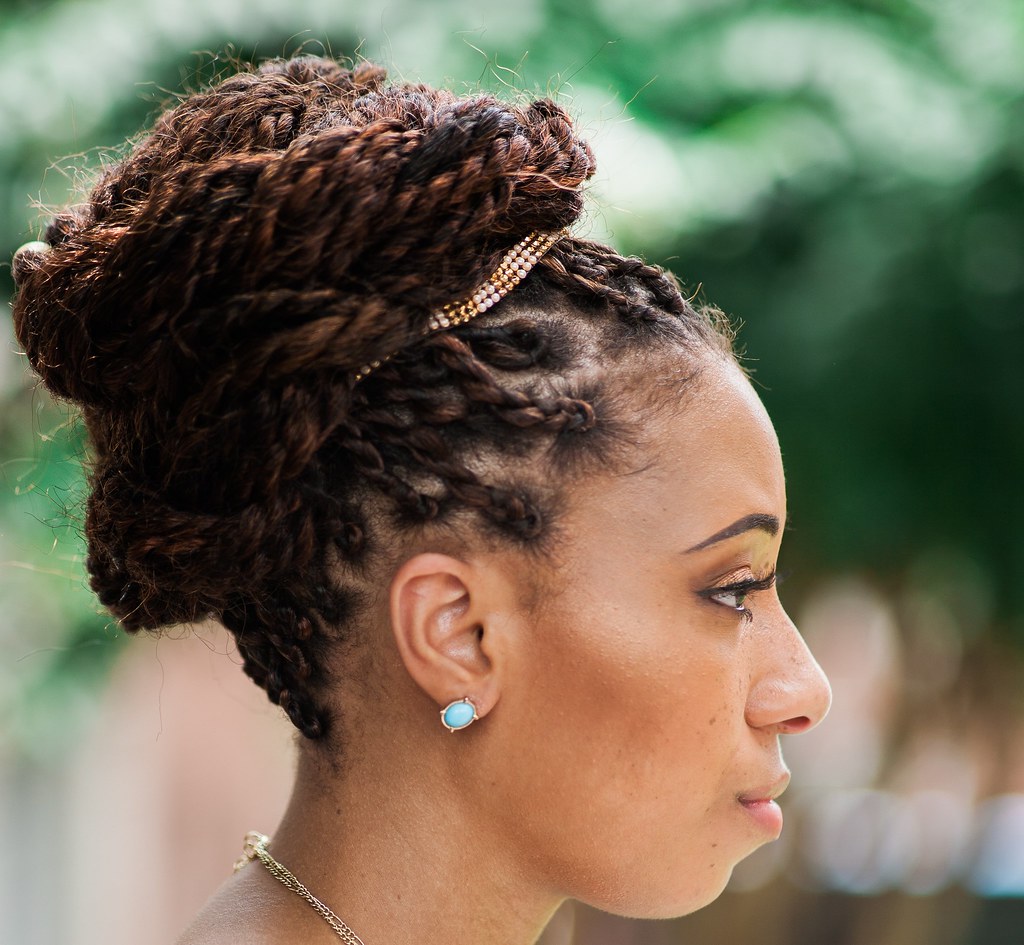 IMG_8521 by eke2k62, on Flickr
στο κεντρο ειναι αξιοπρεπης σε f/1.8 kai soft στα ακρα (αλλα δε νομιζω οτι ενδιαφερει κανεναν εκει, αφου προοριζεται για πορτραιτα).
Γινεται πολυ οξυς σε f/4 και πανω, ακομα και στα ακρα.
Εδω θα βρειτε πολλα δειγματα απο χρηστη του flickr
https://www.flickr.com/photos/117279548@N08/sets/72157651737459088
IMG_8521 by eke2k62, on Flickr