CLOCK
1. AUTO (default)
VEGA will use the best possible internal clock precision to lock on any inputs.
This function provides perfect balance between sound quality and locking
stability.
2. COARSE
VEGA will use higher input lock bandwidth, allowing itself to lock on most digital
sources even with aggressive jitter noise. This option will not affect USB
input. A small icon: will appear on the main screen in the middle of right
end to remind you of using this option.
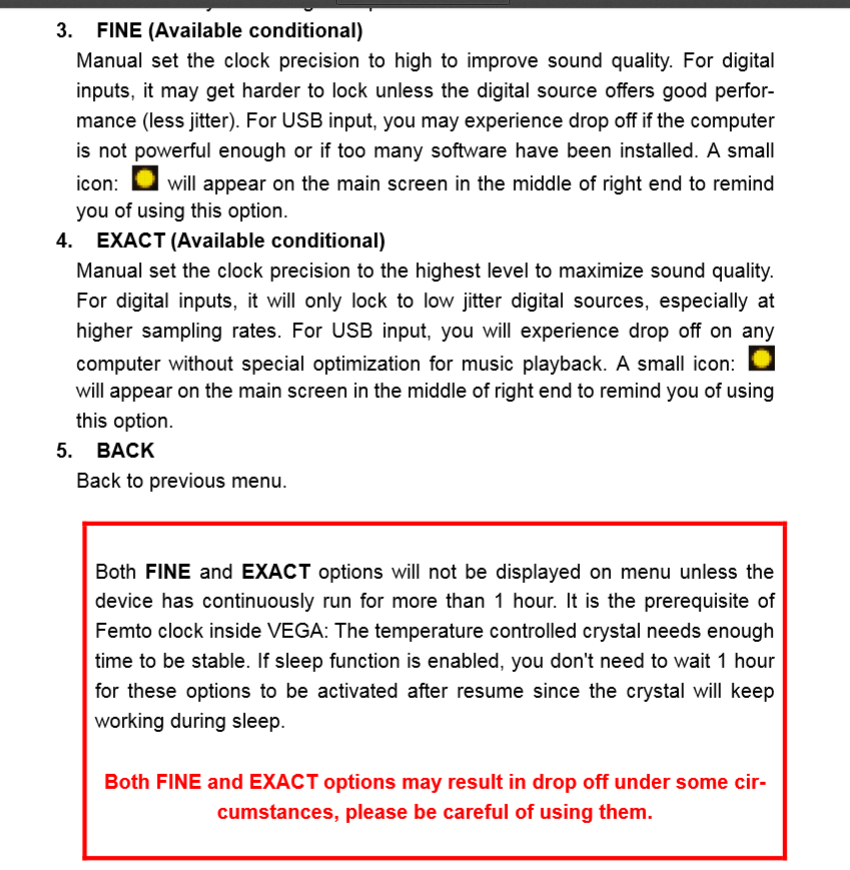
3. FINE (Available conditional)
Manual set the clock precision to high to improve sound quality. For digital
inputs, it may get harder to lock unless the digital source offers good performance
(less jitter). For USB input, you may experience drop off if the computer
is not powerful enough or if too many software have been installed. A small
icon: will appear on the main screen in the middle of right end to remind
you of using this option.
4. EXACT (Available conditional)
Manual set the clock precision to the highest level to maximize sound quality.
For digital inputs, it will only lock to low jitter digital sources, especially at
higher sampling rates. For USB input, you will experience drop off on any
computer without special optimization for music playback. A small icon:
will appear on the main screen in the middle of right end to remind you of using
this option.
--- Αυτόματη συγχώνευση μηνύματος ---
Είναι συνδυασμός femto clock με την υλοποίηση του φίλτρου της Auralic που καταπίνει υπολογιστές.
Το είχα συζητήσει με φίλους σε δίπλα χωριό, από όπου και πήρα το παραπάνω κομμάτι...