
Επειδή "τρώγωντας ανοίγει η όρεξη" γίνεται τεχνικά να αλλάζουν οι εικόνες τα screenshots από την ταινία που εμφανίζονται στην οθόνη και καλά του κινηματογράφου σαν slideshow;
Υ.Γ. έχω πολύ φαντασία ε;
Υ.Γ. έχω πολύ φαντασία ε;
Αγαπητοί φίλοι και φίλες,
Σας προσκαλούμε να γιορτάσουμε μαζί τα 20α γενέθλια του AVclub.
Το Σάββατο 10 Οκτωβρίου, από τις 18:00 θα πραγματοποιήσουμε το πάρτι των γενεθλίων του φόρουμ μας στο Peñarrubia Lounge.
Δηλώστε τη συμμετοχή σας εδώ, θα χαρούμε πολύ να σας δούμε από κοντά.


2.1.3
    - Fixed the issue with image resolution since a change on TMDB side

2.1.2
    - Fixed the scan issue when some temp files are present in source folders
    - Fixed the refresh of edition panel after processing one movie
    - Fixed the update of index categories. It did not work when the movie file
      or folder contains some specific characters
    - Replaced the word "Processed" with "Checked" in the status filter
    - Removed the video wall option for Mede8er. You can now select the
      resolution of posters and synopsis in the interface tab
    - Hid the Dune Path when the basic mode is selected or the profile is
      Mede8er or TViX
    - Added the use of relative paths when basic mode is selected.
    - Added the reset of item.xml files if they are not valid
    - Removed the ability to select a series folder for Mede8er and TViX
    - Updated the language files

2.1.1
    - Added support of extension .img for video files
    - Added estonian language
    - Updated some language files (CZ, DA, DE)
    - Changed the rendering of movie posters for Mede8er (video wall only)
        Now movie posters are rendered with template parameters
    - Changed the size of synopsis for TViX 6600/S1/N1 (1920x1080)
    - Fixed the not working "Change" action for tv series
    - Fixed the exception that occured in some cases when scanning folders

2.1:
    - Added the basic mode for Dune players
        Movies and series are supported. Each media must be in a dedicated
        folder named with the media title. There is no more need to export.
        When you process a media, all needed files are directly saved in
        the movie folder.
    - Added the compatibility with Mede8er and TViX media players
        For these devices, only movies are supported. Each movie must be in
        a dedicated folder named with the movie title. There is no need to
        export. When you process a movie, all needed files are directly
        saved in the movie folder.
    - Added the management of a personal selection of movies
        In the Dune interface, this selection appears as a movie category.
        The default name of this category is "Selection" and can be changed
        in yaDIS options. Members of the selection are displayed in bold
        characters in the list of medias.
    - Added keyboard shortcuts for some actions
        Ctrl-A: Select all items
        Ctrl-D: Unselect all items
        Ctrl-S: Add to/Remove from the personal selection
        Ctrl-T: Toggle the check state
           DEL: Remove the selected items from the list
    - Added the ability to choose the movie categories to display in the
      Dune interface
    - Added the ability to reload media information for a multiple selection
    - Added the extension ".jpeg" for the image selection window
    - Added the extension ".mk3d" as a valid video file
    - Added tooltips on some buttons
    - Updated MediaInfo library for better detection of technical information
    - Changed the Dune interface structure
        The output generated by the program now weighs twice less and the
        duration of export was extremely reduced
    - Changed the design of the menu in the Dune interface
    - Changed the template definition file structure
        Old custom templates are no more compatible. Please update these
        templates to make them working with this version.
    - Changed the design of the list of medias
        No more groups in the list and two filters have been added (type
        and status).
    - Fixed the bad behavior of the category "Recently added"
    - Fixed the getting of movie certifications from TMDb
    - Fixed the bad display of the rating "10"
    - Fixed the disappearance of the genres when TMDb is not responding
    - Fixed the not working remote control for titles that contain special
      characters

2.0.5:
    - Added themoviedb.org support
    - Added the choice of the language for the installer (english or french)
    - Added display of real filenames in the list of medias
    - Added several movie formats (aspect ratios)
    - Added in context menu the link to the movie's page on TMDb (on TVDB
      for series)
    - Added Poland language file (thanks to desss)
    - Added the use of the duration reported by MediaInfo (except for DVD/BD
      structures and isos)
    - Updated some language files
    - Fixed no display of 6 and 9 certifications for Netherlands
    - Fixed the exception when the field "First Aired" is empty
    - Removed Ciné-Passion support (temporary)
    - Removed migration of old 1.0 workspaces

2.0.4:
    - Added 38 flags (thanks TheLastMohican)
    - Added a purple icon in the media list for processed movies that have not
      been found in the database.
    - Added a search button next to the manual search field
    - Added the message "No information found" in the search window if
      a search gives no results.
    - Added the romanian language (thanks jbtc).
    - Added changelog.txt in the installation package.
    - Added support for M4V files. It should be ok now ;)
    - Changed behavior of the manual search field: the field has now the
      focus when entering the search window and it is no more cleared between
      searches.
    - Updated some language files: danish, russian, german, spanish and dutch
    - Updated the fonts to display correctly the romanian and turkish
      languages (thanks again petdiv).
    - Fixed a string that was always displayed in french.
    - Fixed some wrong images for the template "Origins (no ratings)"
    - Fixed the impossibility to process tv-shows when bulgarian or thai
      language is used.
    - Fixed the display of Holland certification ratings
    - Fixed the bad generation of "media_url" with media paths that use a
      network drive
    - Fixed the issue with certification ratings that were not modifiable
      with manually entered movies.

2.0.3:
    - Fixed the issue with german and dutch synopsis that were not modifiable.
    - Updated the czech language file (thanks petdiv).
    - Updated the fonts to display correctly the czech
      language (thanks petdiv).
    - Updated the logo image in the "About" window.
    - Added certification ratings for Holland.
    - Added a BD 3D case.
    - Added a new template: "Origins (no ratings)" (same template as Origins
      but without the display of ratings)

2.0.2:
    - Improved movie search.
    - Changed the media deletion method. It is now possible to perform certain
      tasks during the interface cleaning.
    - Changed the behavior when the selected Dune interface location is not
      empty. A sub-folder "_yaDIS" is automatically added to the selected path
      in order to avoid any loss of data. Consequently, the previous warning
      messages were removed.

2.0.1:
    - Fixed list of actors that were not retreived.
    - Added a second warning when selecting a Dune interface location that is
      not empty.
    - Fixed the exception when selecting some newly processed movie (for some
      BD structures).

2.0:
- Initial releaseΚαλησπέρα σε όλους,
Θα ήθελα να μάθω πως μπορώ να βάλω το εικονίδιο του yaDIS στο αρχικό μενου χωρίς να χρειάζεται να μπαίνω καθε φορά στο φάκλεο που το έχω βάλει.
Ευχαριστώ πολύ
Εγω έχω ένα άλλο θεματάκι , πιό πολύ σπαστικό παρά σοβαρό:
Από την πρώτη έκδοση ακόμα του yadis, αν κάνω αρκετή ώρα πλοήγηση μέσα στο yadis χαζεύοντας ταινίες-σειρές κλπ , κάνει restart το dune (ευτυχώς που μπουτάρει σχετικά γρήγορα).
Τυγχαινει σε κανέναν άλλο αυτό;
Και σε μένα, αλλά μικρό το κακό συμφωνώ
Εισαι σίγουρος πως η ip που παίρνει το dune είναι αυτή που έγραψες;Είπα να ξανασχοληθώ με το εν λόγω app αφου η κυρία HDI μας έχει συνδεμένους εκεί που μας έχουν και οι πολιτικοί μας...
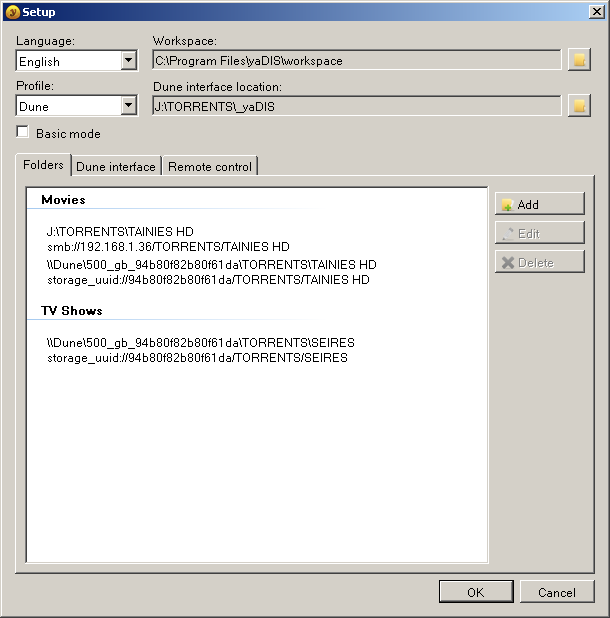
Έβαλα εναν 500άρι δίσκο στο Dune Max (έχει μπόλικα αρχεία μέσα) και ακολούθως τον φάκελο yadis (Dune interface location) σε εναν δισκο απο το PC τον οποίο και τον κάνω share και βλέπω τις ταινίες μου μέσω Dune.
Ότι κι αν κάνω όταν πάω να δώ ταινία απο τον δίσκο του PC μου λέει "Failed to open url" !!
Ότι περιέχεται στον δίσκο του Dune παίζει μια χαρά...
Θέμα δικτύου ΔΕΝ παίζει γιατί απο τον browser του Dune χειροκίνητα τα πάντα λειτουργούν μια χαρά....
Επίσης δοκίμασα να βάλω τον φάκελο Dune interface location και στο δίσκο του player ανεπιτυχώς αφου και πάλι το ίδιο μήνυμα εξακολουθεί να βγαίνει κάθε φορά που πατάω το Play...
Η πλάκα είναι ότι παλιότερα δούλευε....
Έψαξα παντού και βλέπω ότι δεν υπάρχει λύση....Του καθενός διορθώθηκε με διάφορους τρόπους οι οποίοι σε μένα δεν.......
Για πείτε ρε παλικάρια γιατί ειλικρινά με χει τρελάνει σήμερα...
Oπως αναφέρω και παραπανω στο φακελο _yaDIS (Dune interface location ) μπαινουν όλα τα εξώφυλλα και τα στοιχεια που αφορούν τις ταινιες μας και στην ουσια μεσω αυτου γινετε η πλοήγηση στο μενου που δημιουργεί το Yadis.
Αν οι δισκοι παιζουν μεσω δικτύου φυσικα εννοείται πως αυτος ο φακελος πρεπει να βρίσκεται μεσα σε έναν από του δίσκους που εχετε δικτυωμένους.
Δυστυχώς εδώ αντιμετωπίζω ένα πρόβλημα..
Εχοντας τοποθετήσει τον φακελο _yaDIS σε ένα από τους δικτυωμένους μου δισκους παρατήρησα πως με αυτό τον τροπο δεν παιζει τις ταινιες που βρίσκονται στους διπλανους δισκους αλλα μονο αυτές που βρίσκονται στον ιδιο δίσκο .
Αν εχετε και εσεις το ιδιο προβλημα μη σκατε.
Τοποθετήστε το φακελο _yaDIS στον εσωτερικό σκληρο δισκο του Dune σας ( στη περιπτωση μας prime η base) και δεν θα εχετε προβλημα .
Αν παλι το dune σας δεν υποστηρίζει εσωτερικό δισκο , μπορειτε να χρησιμοποιήσετε ένα φλασάκι σε μια από τις Usb θύρες του player.
Δηλαδή αυτό που θα πρεπει να κανουμε είναι να δημιουργήσουμε ένα φακελο _yaDIS (Dune interface location) μεσα στο φλασακι .
Αυτό ο τροπος μεν δουλεύει αλλα εχει το μειονέκτημα της αργής ενημέρωσης για νεες ταινιες όπως και την αργη πλοήγηση στο μενου του yadis.
nemesi54 said:Επίσης δοκίμασα να βάλω τον φάκελο Dune interface location και στο δίσκο του player ανεπιτυχώς αφου και πάλι το ίδιο μήνυμα εξακολουθεί να βγαίνει κάθε φορά που πατάω το Play...
We use essential cookies to make this site work, and optional cookies to enhance your experience.

